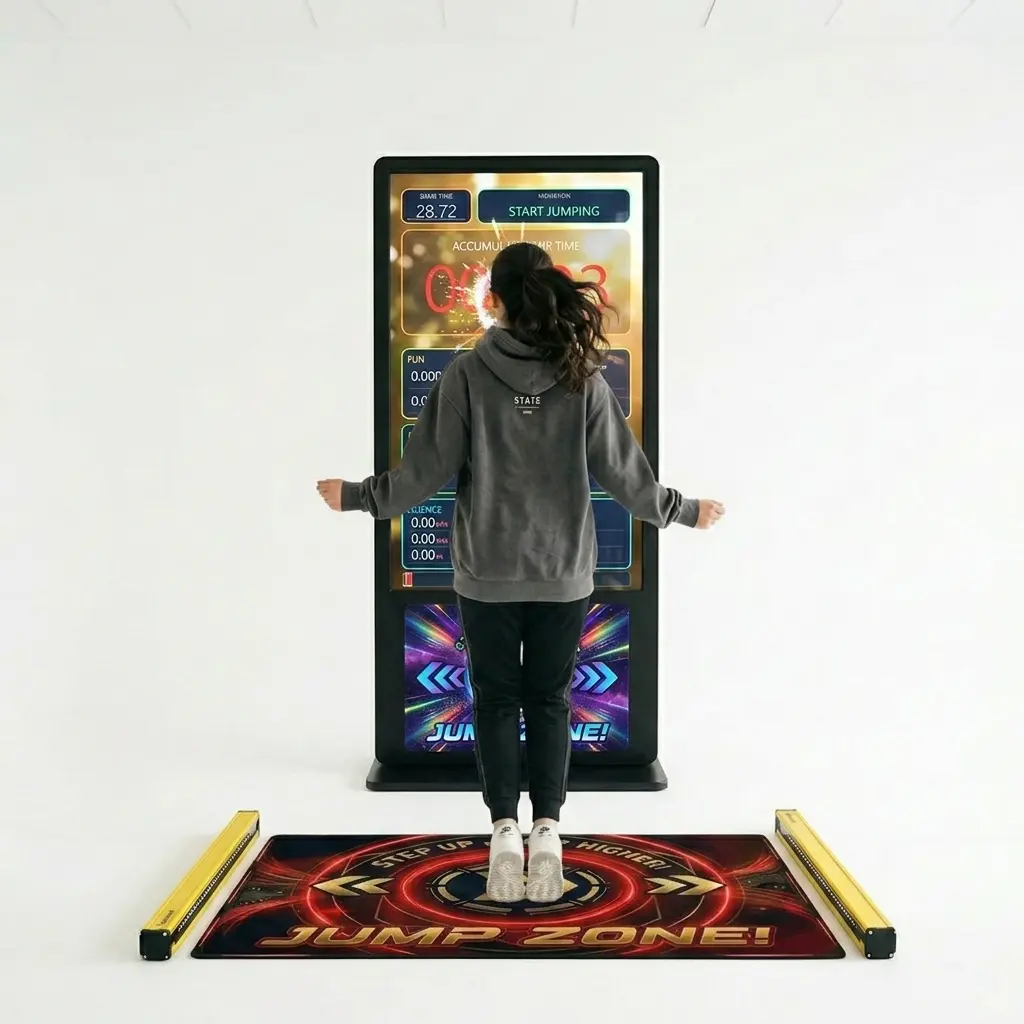
An interactive jump rope arcade machine that measures real jump air-time and turns physical play into a crowd-pulling competition. Fully automated, plug-and-play and unattended, it runs 20–50 players per hour across three modes (Fun, Fitness, Science) runs on any windows OS system. Small footprint, no moving parts, fully brandable — built in-house for trade shows, brand activations, fitness clubs and events. No computer screen ? Add our 55″ 4K touchscreen display kiosk with windows operating system for a full and seamless plug and play experience.
Turn jumping into a crowd-pulling competition — an interactive jump rope arcade machine that measures real air-time and turns physical play into a magnet for attention.
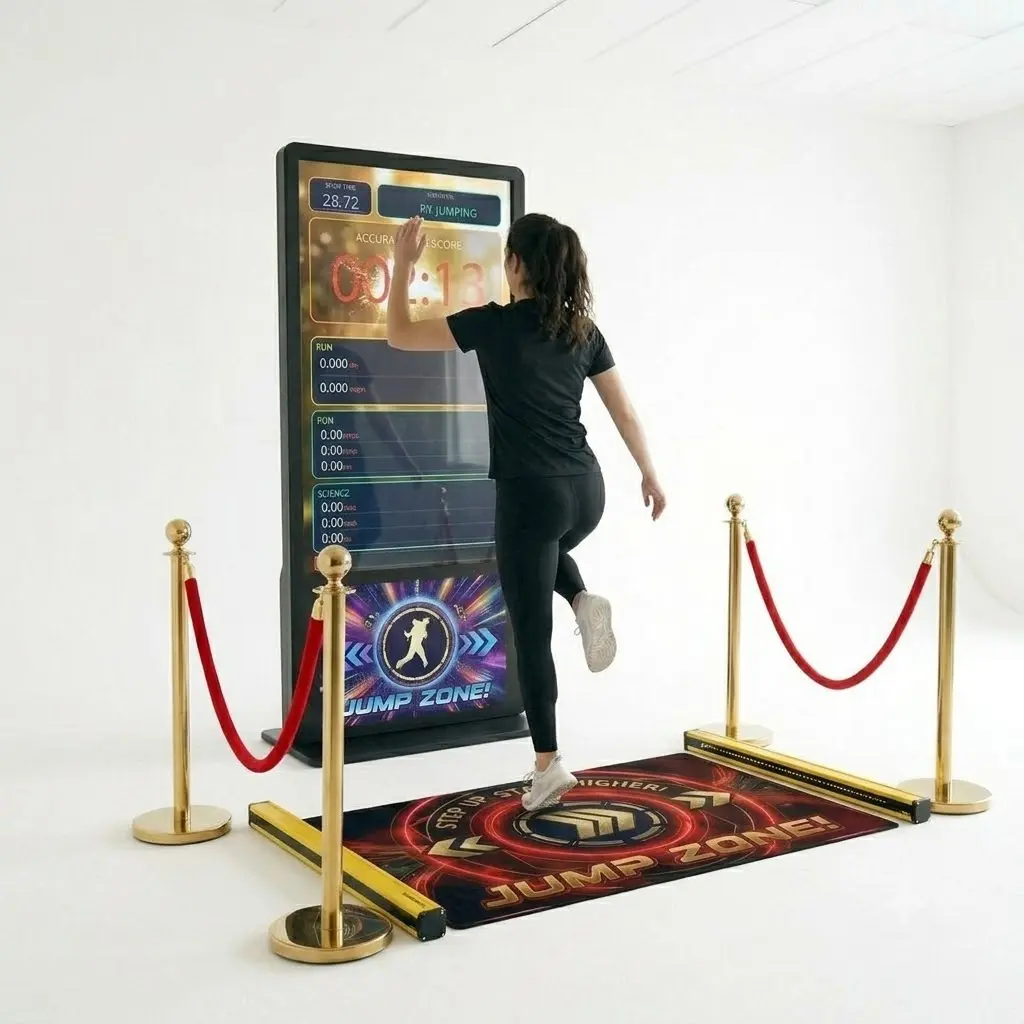
Visitors simply step up to the mat and jump. The challenge reads instantly, so there’s no learning curve and no host needed — players understand the game the moment they see it, and spectators gather to watch. Built for B2B environments, it’s engineered for reliability, throughput, and minimal supervision, handling 20–50 players per hour for high-traffic settings like trade shows, exhibitions, fitness clubs, and public events.
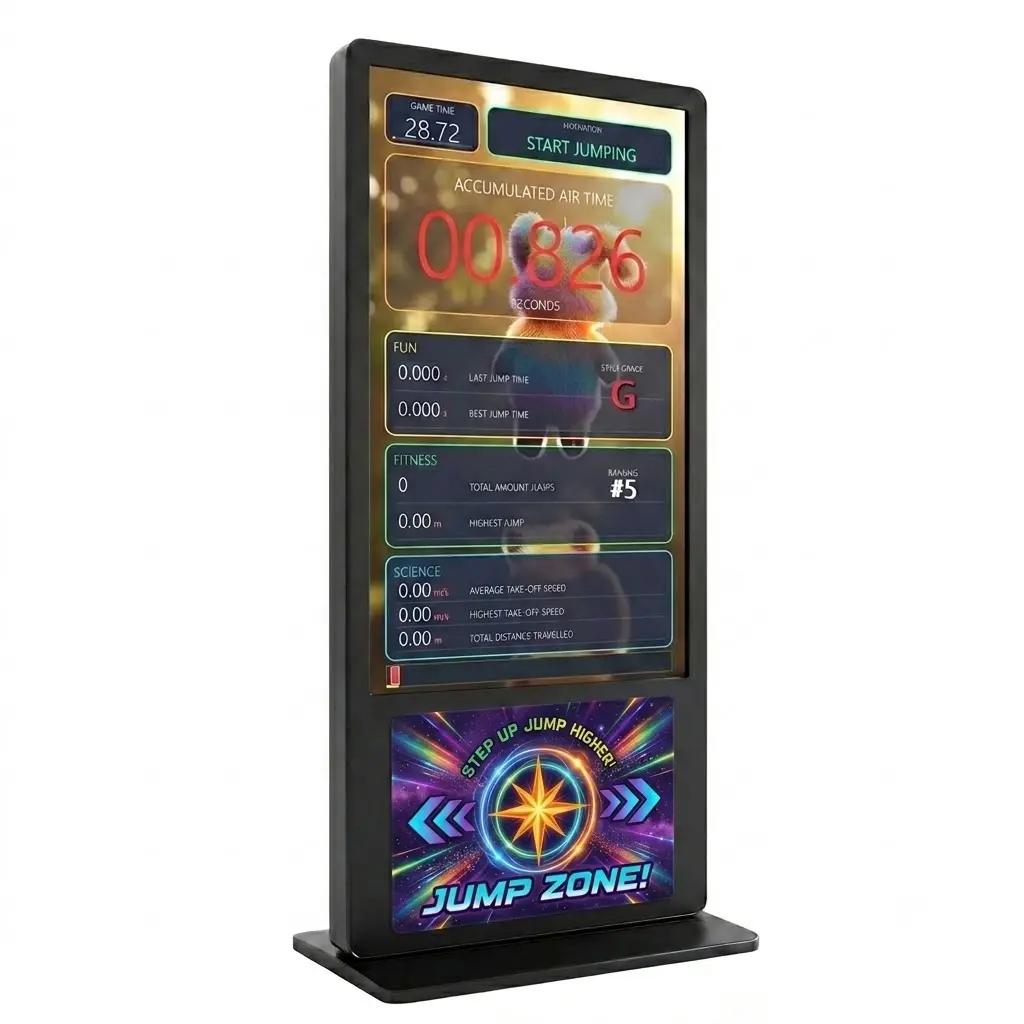
Three modes keep it fresh for every audience: FUN grades rhythm, style and consistency; FITNESS measures speed, energy and endurance; and SCIENCE reports take-off velocity, average jump height and total vertical distance. Results land on a large 55″ 4K screen that pulls eyes from across the room.
Why it works on the floor
Active games work harder. Physical gameplay stops people in the aisle, and competitive scores keep them watching — the kind of buzz that builds dwell time and gets visitors to engage with you directly. Because each game cycle runs just 30–60 seconds, you move many participants through per hour while the leaderboard fuels rematches. The visual feedback and competitive scores naturally encourage filming and sharing, so the experience becomes content people post and talk about long after the event. Performance metrics are captured for leaderboards, competitions, and campaigns, turning attention into measurable participation.
Fully branded, built in-house
Because MadeforArcade designs and builds this machine 100% in-house, it can be fully customised and branded for you. Graphics and colours match your campaign or sponsor, and a large engaging billboard area can carry your product, logo or call to action — ideal for sports, energy, and lifestyle activations. Want to go further? Just about everything on the machine can be adjusted or modified as a custom-build option. It’s a buy-once brand asset you can redeploy across trade shows, festivals, product launches, and roadshows.
Set it up and let it run
It does not get simpler: plug and play, around 5 minutes from power to first player, with fully automated unattended gameplay so your staff stay free to do what they do best. The footprint is small — place the sensor mat and jump area anywhere within 2 metres — yet the impact is huge at any venue. Audio effects, coloured LED rings, and a high-score memory system build a competitive experience for players of all ages. And it’s reliable by design: no moving parts to break down, every player interaction is touch-less, and the electronics are robust. Technical staff is always available for questions and support.
Also known as a jump rope simulator or air-time fitness game. GDPR-compliant lead-capture is available as an option, alongside full branding and custom modifications.
game consists of : personalised jump mat, sensor arrays to measure jump statistics, control unit/microprocessor, power supply, 55″ touchscreen kiosk with windows OS (optional)
This EC Declaration of Conformity (Annex II.1.A, Machinery Directive 2006/42/EC) confirms that the Interactive Jump Rope Arcade Machine – Air Time Fitness Game for Events, Gyms & Brand Activations, manufactured by Made for Arcade B.V., Besterdstraat 9a, 5051HH Goirle, Nederland, complies with the relevant provisions of the Machinery Directive 2006/42/EC, EMC Directive 2014/30/EU and RoHS Directive 2011/65/EU.
Harmonised standards applied: EN ISO 12100:2010, EN IEC 61000-6-1, EN IEC 61000-6-3, EN IEC 63000. The technical file is held by the manufacturer at the address above.
The Jump Rope Simulator is an interactive arcade and fitness machine that measures total jump-rope air-time to the millisecond; this manual covers set-up, play, operator settings, maintenance and safety.
Caution: keep a clear radius of at least one metre around the player at all times, make sure players wear suitable footwear and are physically fit, and mind the moving rope, handles and the mains supply.
Disclaimer
Made for Arcade makes no representations or warranties with respect to this manual and, to the maximum extent permitted by law, expressly limits its liability for any failure to conform to any warranty resulting from the replacement of this manual with another. In addition, Made for Arcade reserves the right to revise this publication at any time without obligation to notify any person of the revision.
The information in this documentation contains general descriptions and/or technical characteristics of the performance of the machine mentioned in this documentation. This documentation is not intended as a substitute for, and should not be used to determine, the suitability or reliability of this machine for specific user applications.
It is the duty of such user or system integrator to carry out — in relation to the relevant specific application or use of the product — an adequate and complete risk analysis, evaluation and testing of the products.
Please note: all images used in this manual are for illustrative purposes only and may differ from the actual product. This is because the colours, dimensions and other properties of the actual product may differ from the image.
Made for Arcade and/or its affiliates or subsidiaries are not responsible or liable for any misuse of the information contained in this document. If you have any suggestions for improvements or changes, or have found any errors in this documentation, please let us know.
All relevant national, regional and local safety regulations must be followed when installing and using this machine. For safety reasons and to ensure compliance with the documented system data, the components may only be repaired by the manufacturer.
If machines are used for applications with technical safety regulations, the relevant instructions must be observed. Failure to observe this information may result in personal injury and/or damage to the machine.
This machine is intended for entertainment purposes only. It is not intended for use for profit, for the wagering or payout of money, or for gambling or games of chance. Made for Arcade makes no representation or warranty that the use, installation or operation of this machine is permitted or lawful in any particular region, country, jurisdiction or venue. It is the sole responsibility of the buyer and/or end-user to ensure that their use of the machine complies with all applicable laws, regulations and licensing or permit requirements (including any gambling, gaming or amusement regulations).
This is the English user manual (or an automatic translation thereof). Manuals in other languages may be available on request.
Power supply and surge protection
Arcade and entertainment machines are computer-controlled and contain sensitive electronics. Mains power at events, venues and even ordinary outlets is frequently unstable or “dirty” — voltage spikes, surges, sags and brown-outs, flicker, overloaded or shared circuits, generators, long extension runs and the switching of nearby equipment can all push the supply outside the machine’s safe operating range.
You must always connect the machine through a good-quality surge protector, and — wherever the supply is unreliable or the machine must not lose power unexpectedly — through an uninterruptible power supply (UPS). These sensitive machines cannot tolerate power spikes, surges, brown-outs or sudden cut-offs.
Damage, data loss or malfunction caused by power-supply problems is not covered by warranty. Failure to use adequate power protection can lead to machine malfunction and, in some cases, a risk of fire or bodily harm. If you are unsure about your power supply, consult a qualified electrician before use.
Duty cycle and cooling breaks
These machines are built for event and venue use, not uninterrupted operation. Their motors, power supplies, controllers and lighting generate heat, and running continuously lets that heat build up beyond the safe operating range. Do not run the machine continuously for more than 4 hours. After every 4 hours of use, switch it off completely for at least 10 minutes, by disconnecting the power supply, to let the components cool before resuming.
Overheating from exceeding this duty cycle can cause reduced performance, premature wear, component failure and, in some cases, a risk of fire or bodily harm. Damage or malfunction resulting from continuous operation beyond these limits, or from inadequate cooling breaks, is not covered by warranty. Always keep air inlets and outlets clear and unobstructed.
Support and service
For more information, service, technical support, ordering user manuals, or for any other questions, please contact: Made for Arcade Besterdstraat 9a, 5051HH Goirle, The Netherlands Email: [email protected] · Web: madeforarcade.com
Machine description
The Jump Rope Simulator is a freestanding, arcade-style game that challenges players to jump rope as many times as possible within a set time limit. Using an invisible infra-red beam sensor, the unit measures and displays each player’s total air-time on a large, vibrant LED display with millisecond accuracy. The machine is self-contained, fully automated and requires minimal operator intervention during normal play. Audio effects, coloured LED rings and a high-score memory combine to create an engaging, competitive experience for players of all ages.
Unlike conventional counters that merely count jumps, the simulator measures total air-time in thousandths of a second — rewarding both speed and consistency. The better the jump-rope technique, the higher the score.
The cabinet
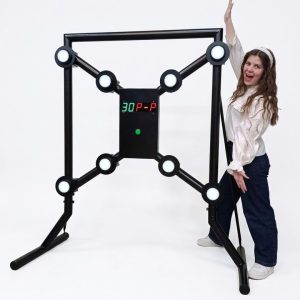
The cabinet is a sturdy upright stand with a base plate for stability. The main body houses an illuminated promotional poster panel with the Jump Rope Simulator branding, a top-mounted display bar containing five large 7-segment LED digits, two circular LED ring indicators (one on each side of the display bar), and all internal electronics, speaker and wiring.
The LED display
The five-digit LED display shows numbers in bright red during gameplay. A reading such as 08.456 means 8 seconds and 456 milliseconds of air-time — the first two digits are whole seconds, the last three are thousandths of a second. A yellow number such as 15 is the countdown during the armed/ready phase, showing the seconds remaining before the game starts.
LED ring indicators
Two circular LED rings, one on each side of the display, act as a visual game timer. All 16 LEDs lit in green means full time remaining; fewer LEDs lit means less time remaining; fewer than 8 LEDs lit switches the rings to red, warning the player that time is nearly up; all LEDs off means game over.
Sound system
A built-in speaker plays voice announcements, countdown beeps, in-game background music and a victory fanfare at the end of each round. The volume is adjustable by the operator (see the Operator settings menu).
Intended use
The Jump Rope Simulator is intended for entertainment and fitness use at home, at events, in gyms and at venues, under supervision as appropriate. Only one player should use the machine at a time, and younger children should be supervised. Players with heart conditions, joint problems or balance issues should consult a doctor before use, and pregnant individuals should not use this attraction. Players should stop immediately if they feel dizzy, short of breath or experience any pain.
Safety warnings
Read all safety guidelines before operating this attraction. Failure to follow these guidelines may result in injury.
Player safety
Ensure the play area has a minimum clear radius of 1 metre around the player.
Players should wear appropriate footwear — no bare feet or loose footwear.
Players with heart conditions, joint problems or balance issues should consult a doctor before use.
Pregnant individuals should not use this attraction.
The game is appropriate for all ages, but children under 8 should be supervised.
Players should stop immediately if they feel dizzy, short of breath or experience any pain.
Do not use in wet conditions.
Strobe warning
This machine may use strobe lighting effects during idle mode. If photosensitive epilepsy or other light-sensitivity conditions are a concern, disable the strobe feature via the Operator settings menu (Menu 1).
Electrical safety
Do not expose the machine to rain, moisture or liquids.
Do not open the cabinet unless you are a qualified technician.
If the power cable is damaged, do not use the machine — contact your supplier.
Use only the supplied power cable and an appropriate mains supply.
Ensure the power socket is easily accessible for emergency disconnection.
Installation and setup
Site requirements
Requirement
Recommendation
Floor space
Minimum 2 m × 2 m (players need room to jump)
Ceiling height
Minimum 2.8 m
Power supply
Standard mains socket (see the rating plate on the unit)
Surface
Flat, non-slip flooring strongly recommended
Lighting
Avoid direct strong sunlight on the IR sensor area
Powering on
Connect the power cable to a mains socket and switch on at the wall. The unit plays a boot-up sound and runs a brief self-check. After approximately 15 seconds the display enters Idle Mode (colourful twinkling LEDs) and the machine is ready for players.
Do not obstruct the IR sensor beam during power-on. Allow the unit to complete its boot sequence undisturbed before presenting it to players.
Operating mode switch
A small internal switch controls how new games are started. In AUTO MODE a game is triggered automatically when a player steps into the sensor beam and holds position for 3 seconds — ideal for unattended locations. In MANUAL MODE an operator or staff member presses the START button to begin each game — ideal for supervised events or controlled environments. The mode switch is located inside the cabinet; consult your installation guide or supplier for the exact location. Only authorised personnel should adjust this switch.
How to play
Players jump rope in front of the machine while the infra-red sensor tracks each moment they are airborne. The score displayed at the end of the game is the player’s total accumulated air-time, measured to the nearest millisecond. The goal is to maximise time spent in the air during the game window.
Step 1 — Idle / attract mode
When no game is active, the display shows a colourful, randomly sparkling light show, and strobe lights may flash periodically to attract attention. The machine is waiting for a player.
Step 2 — Player detected / armed
In AUTO MODE, walk up to the machine, stand in front of the sensor and hold your position for about 3 seconds; the machine detects you and announces a new player. In MANUAL MODE, an operator presses the START button to begin the armed phase. Once armed, a large yellow countdown number appears, counting down from 15. A voice announcement plays and a beeping sound begins in the final 5 seconds — use this time to pick up your jump rope and get into position.
If you are not ready, an operator can press the START button once during the countdown to cancel the game and return to Idle Mode. The machine plays an acknowledgement sound and resets after a short pause.
Step 3 — Game running
When the countdown reaches zero, the game begins. The display switches to red and shows your running air-time score in the format SS.mmm (seconds.milliseconds), with background music throughout. The two LED rings act as your time clock, with LEDs extinguishing one by one: green rings mean plenty of time left, red rings mean less than half the time remains (jump faster), and all LEDs off means game over.
Scoring tip: the sensor measures every moment you are off the ground. Short, fast jumps accumulate air-time quickly, and a smooth, consistent rhythm beats erratic jumping. Missing a jump (feet on the ground) does not add to your score — keep that rope spinning.
Step 4 — Game over / freeze
When the time bar empties, the game ends and a victory fanfare plays. Your final score is shown in orange on the digits while the LED rings flash green. The score stays visible for about 10 seconds, then blinks to draw attention, before the machine automatically returns to Idle Mode for the next player.
Scores and high score
Your score is your total accumulated air-time during the round, in seconds and milliseconds — for example, 12.345 is 12 seconds and 345 milliseconds airborne. A perfect game would see the player airborne for almost the entire round. Beginners may achieve 5–10 seconds, while skilled players can exceed 20 seconds in a standard 30-second round.
The machine stores the all-time high score in permanent memory, which survives power-offs, power cycles and restarts. During Idle Mode the display runs a repeating three-phase cycle so every bystander can see the record to beat: 10 seconds of twinkling attract animation, 6 seconds with the high score shown steady in green, then 4 seconds with the high score blinking in green, before the cycle repeats. If a player beats the current high score, the new score is saved immediately and shown in the next idle cycle. Operators can reset the high score to zero at any time through Menu 4 in the Operator settings menu.
Operator settings menu
The settings menu is accessible from the machine’s front controls without opening the cabinet. While the machine is in Idle Mode, press and hold the START button (Button A) for at least 5 seconds; the menu activates as soon as the hold time is reached and you do not need to release the button first. A voice announcement confirms the selected menu item, the leftmost digit illuminates in purple to indicate the active menu item number (1–4), and the right-hand digits show the current value in cyan.
The menu exits automatically and returns to Idle Mode after 10 seconds of inactivity, with a voice announcement confirming the exit. All changes made before exit are saved automatically to permanent memory.
Navigating the menu
The menu uses two physical buttons. A short press of Button A (START) — released within about 0.8 seconds — cycles to the next menu item (1 → 2 → 3 → 4 → 1), with a voice announcement naming the new item. Pressing Button C (CONFIRM / CHANGE) once changes or confirms the current setting, playing a short beep immediately followed by a voice confirmation. After entering the menu via the 5-second hold, Button A must be fully released before short-press cycling activates, which prevents accidental skipping of menu items on entry.
#
Option
Values / range
Button C action
1
Strobe Lights
ON (01) or OFF (00)
Toggles the strobe on or off; voice confirms “strobe lights on” or “strobe lights off”. Disable if photosensitivity is a concern.
2
Volume
0 (mute) to 26 (max)
Increases volume by one step, wrapping from 26 back to 0; the new level plays immediately so you can hear the change.
3
Game Time Length
10 s to 120 s in steps of 10
Increases game duration by 10 seconds, wrapping from 120 back to 10; shown as 3 digits (e.g. 030 = 30 seconds). Takes effect on the next game.
4
Reset High Score
Shows the current high score (cyan)
Resets the high score to 00.000 and saves immediately; voice confirms “reset high score to zero”. This cannot be undone.
Every change made in the menu is written to internal flash memory immediately and restored automatically the next time the machine boots, including strobe preference, volume, game-time duration and the high score.
Sound and LED reference
The machine guides players and operators with voice and audio cues: a boot chime at power-on; a new-player announcement when the armed countdown begins; countdown beeps in the last 5 seconds; in-game background music; a victory fanfare at game over; an abort/reset sound when a game is cancelled during the armed phase; a menu voice naming each item as you cycle to it; a beep and voice confirming each setting change; and a timeout voice (“no buttons pressed for 10 seconds, exiting menu”) as the menu exits.
Colour
Location
Meaning
Multi-colour sparkle
All digits
Idle / attract mode — waiting for a player
Yellow
Digit display
Armed countdown — player detected, get ready
Red (blinking)
Side LED rings
Armed phase — waiting for the game to start
Red
Digit display
Game in progress — live air-time score
Green
Side LED rings
Game in progress — more than half the time remaining
Red
Side LED rings
Game in progress — less than half the time remaining
Orange
Digit display
Game over — frozen final score
Green (flashing)
Side LED rings
Game over — celebrating the player’s score
Purple
Leftmost digit
Operator settings menu is active
Cyan
Right two digits
Current setting value in the operator menu
Daily operation for operators
Opening checklist
Inspect the jump rope and playing area for hazards or obstructions.
Power on the unit and wait for the boot chime and twinkling idle display.
Confirm audio is at an appropriate level for your venue.
Play a test round to confirm the IR sensor, LEDs and sound all function.
Ensure adequate floor space is clear around the machine.
During operation
Monitor the play area to ensure players are using the machine safely.
Remind players to use the jump rope in the designated area only.
Only one player should use the machine at a time.
Ensure younger children are supervised.
In AUTO MODE, the machine handles player transitions automatically.
Closing checklist
Note the current high score if you wish to record it.
Power off the unit at the wall switch.
Store the jump rope in a safe location if removable.
Wipe down the cabinet surface if needed.
Troubleshooting
Symptom
Action
No display / machine is dark
Check that the machine is plugged in and the wall socket is switched on. Try power cycling (off, wait 10 seconds, on).
No sound / very quiet
Enter the Operator settings menu and increase the Volume setting (Menu 2). Confirm it is not set to 0.
Game starts by itself / false triggers
In AUTO MODE this is expected if something interrupts the beam (e.g. a nearby object or a passer-by). Check for obstructions near the IR sensor, position the machine away from high foot-traffic paths, or switch to MANUAL MODE.
Score always reads 00.000
The IR sensor beam may be permanently broken (obstructed). Check that the sensor area is clear during play and clean the sensor lens with a dry cloth if dirty.
Machine stuck in armed state
Press the START button once to cancel and return to Idle. The machine waits 5 seconds and then resets automatically.
High score shows the wrong value
Reset the high score via Menu 4 (hold Button A for 5 seconds from Idle, navigate to item 4, press Button C). This is immediate and permanent.
LEDs flickering or partial display
Power cycle the machine. If the problem persists, contact your authorised service technician — do not attempt to repair internal LED strips yourself.
Maintenance and care
Routine cleaning
Wipe the exterior cabinet with a dry or lightly damp cloth. Do not use solvents.
Clean the IR sensor lens gently with a dry microfibre cloth if dusty or smudged.
Inspect the jump rope for signs of wear — replace if frayed or damaged.
Check the power cable for any damage at each service visit.
Service intervals
Visual inspection of all LEDs and the display: monthly.
Full electrical safety check: annually, by a qualified technician.
Jump-rope replacement: when worn or as required.
Storage
If storing the machine for an extended period, power off completely, clean the exterior and store in a dry, temperature-controlled environment. Cover the display panel to prevent dust accumulation.
Taking the machine out of service
Power off the unit at the wall switch and remove the plug from the socket so the power supply is completely interrupted. Do not leave the machine unattended while it is connected to the power supply.
Technical specifications
Property
Value
Display
Five 7-segment LED digits, bright red during the game
Score resolution
1 millisecond (0.001 second)
Maximum displayable score
99.999 seconds
Game duration (default)
30 seconds (adjustable 10–120 s in 10 s steps via Menu 3)
Armed countdown
15 seconds
Auto-arm detection
3 seconds of continuous beam break
LED time rings
Two rings of 16 LEDs each (green → red indicator)
Volume range
26 levels (0 = mute, 26 = maximum)
High-score memory
Persistent (stored in internal flash; survives power cycles)
Settings memory
All operator settings stored in internal flash (NVS)
Operating modes
AUTO (beam-trigger) / MANUAL (button-trigger)
Strobe effect
Operator-selectable ON/OFF via Menu 1
Settings menu entry
Hold Button A for 5 seconds from Idle Mode
Settings navigation
Button A (cycle items), Button C (change/confirm value)
Voice guidance
Voice announcements for all menu items and confirmations
Specifications may vary or change over time. Verify all specifications prior to purchase. No rights can be derived from this information.
Questions
Can it be branded with our design?
Yes — most machines can be branded by our design department per your specifications. Simply send your artwork and our team will go to work for you, delivering a turn-key custom-branded solution.
Do you provide warranty on your machines?
Absolutely! Each machine comes standard with a 1-year full service and parts warranty at any of our service centers, no questions asked. You can extend warranty to a full 2 years by clicking the option box above (highly recommended). See our T&C for details.
Do you ship to my country?
Yes — for sales we ship worldwide; for rentals we prefer to limit shipping to Western Europe. And if you have your own carrier account (FedEx, DHL, etc.) you can always arrange to have your order picked up from our service centers.
How are products packed?
For trucking, train or air cargo, crating is needed — check the option box above to add the custom wooden protective crating the carrier requires. If you arrange your own pickup, crating is optional and may save you the cost of having a custom frame built.
Can I rent this instead of buying?
Most of our machines are available to rent for events and activations. Tell us the venue and dates and we’ll quote rental + transport, or both prices so you can compare.
Can you pre-load our prizes, tokens or content?
Yes — we can pre-load prizes, capsules, tokens or your own media so the machine arrives play-ready for your event.







 English
  French
  German
  Spanish
  Italian
  Dutch
Dutch  Portuguese
  Polish
  Bulgarian
  Swedish
  Romanian
  Danish