Reselling or renting entertainment machines? MFA Pro partners get more →

universal remote credit system – add credits to arcade machines discretely

 349,00

MFA Pro partners save more than  41,88 on this — log in

A universal keyfob remote that adds free credits to any arcade machine over a secure 433 MHz radio link — press a button and a free play appears, no coins or tokens required. It works alongside the machine’s normal coin comparator and can be built into any MadeForArcade machine, letting you discreetly decide who plays and when. Ideal for tradeshows and retail activations where you want to reward real prospects without leaving the counter.

SKU: MFA-remote Categories: , Tags: , , Brand:

Ex-VAT · EU businesses outside NL pay 0% VAT with a valid VAT number (entered in the cart).

Request a quote
Ships worldwide from our NL service centerBuy or rentCustom branding available

Brands we’ve worked with include Louis Vuitton · eBay · Unibev — and many more.

Universal keyfob remote control for adding credits to arcade machines

Hand out free plays from your pocket — no coins, no tokens, no walking back to the machine. The Universal Keyfob Remote Control lets you add a credit to any arcade machine with a single discreet button press.

Built around a secure 433 MHz radio link, this compact remote drops a free credit onto the machine the moment you press the keyfob. It works alongside the machine’s normal coin comparator, so guests can still drop tokens or coins right next to the games you choose to activate remotely — giving you full control over who plays and when.

Why it works on the floor

At a tradeshow or activation, the keyfob turns the machine into a reward you control. A salesperson can keep it in a pocket while working the aisles, then trigger a free play only for genuine prospects mid-conversation — rewarding the people you actually want to engage instead of letting passers-by tie up your floor space. The result is more meaningful interactions, longer dwell time at your stand, and a frictionless way to turn a chat into a memorable, share-worthy moment.

For retail, it’s just as powerful. Imagine a claw machine dispensing promotional items: after a purchase, the person behind the counter presses a button and the customer earns a free play to try their luck — operated easily and securely without ever leaving the till. One operator can manage multiple machines from a single location, activating credits remotely instead of physically reaching each cabinet.

Discreet, secure, and built in

Because it runs on 433 MHz radio waves, the connection stays secure and reliable — only authorised personnel can add credits, preventing misuse and giveaway leakage. The remote can be integrated into any MadeForArcade machine or custom built for your own cabinets, whether that’s a classic upright, a pinball table, or a retro console. It installs discreetly, doesn’t alter the machine’s normal operation, and syncs in minutes using the supplied manual — no complicated setup.

Also known as a remote credit system or keyfob credit activation for arcade machines. One keyfob controls one machine; custom integration with your existing cabinets is available as an option. Please add 1–2 weeks to standard delivery times.

Open / print this manual → Download PDF

Remote Control — Installation Manual

The Made for Arcade universal remote control installs in just 3 steps. It connects to the back of your coin comparator or coin acceptor and works alongside it. Once installed you can still use coins, or press the remote button to simulate a coin being inserted.
STEP 1

Unplug the coin comparator

Remove the 4-prong plug (usually with 3 wires) from the back of the coin comparator.

Step 1 — remove 4-prong plug from coin comparator
STEP 2

Connect the remote

Connect the female connector from the remote control to the male connector from the machine — the plug you just removed in Step 1.

Step 2 — connect remote female connector to machine
STEP 3

Power the remote & test

Connect the male connector from the remote to the female connector in the coin comparator.

Yellow wire+12 volts
Red wireGND / Ground
See the markings on the side of the coin comparator.

Turn on the machine and set it to PAID PLAY (coins or tokens). Press “A” on the remote → a credit should be added.

Step 3 — wiring and key fob remote Coin comparator wiring markings: +12V and Ground
MODE SELECTION

Setting the correct mode

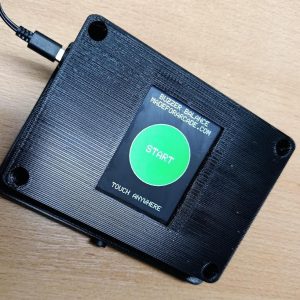
Open the box cover. It may be sealed with hot-glue — carefully pry it open with a screwdriver, or soften the glue with warm air (hair dryer).

Inside is a small white programming button (red arrow). With the machine on and the board plugged in, press “A” on the remote — a red or blue light briefly flashes. Use the white button to switch modes:

1. Momentary — USE THIS MODE ONLY. The light stays on only while “A” is held.

2. Toggle — DO NOT USE. “A” turns the light on, pressing again turns it off.

Bad signal? Try aiming the antenna (yellow arrow) for better reception.
Mode selection — programming button and antenna on the controller board
4.8/5 from 33+ Google reviewsRead reviews →

Fastest

Buy it online

  • Instant price lock-in — no waiting on email
  • Fastest turnaround: order today, we start handling today
  • Secure checkout, invoice generated automatically
Buy now

Tailored

Get a quote

  • Custom branding, bundles & volume pricing
  • Rental and event options for this machine
  • Advice from the crew that builds them
Request a quote

Specifications

Weight1 kg
Ease of usemedium
Set-up time3 min
Power requirement12 volts
Event typeAll event types
Featuresuniversal remote
Containsremote button fob
ReferenceMFA-remote

Specifications may vary or change over time. Verify all specifications prior to purchase. No rights can be derived from this information.

Questions

Can it be branded with our design?

Yes — most machines can be branded by our design department per your specifications. Simply send your artwork and our team will go to work for you, delivering a turn-key custom-branded solution.

Do you provide warranty on your machines?

Absolutely! Each machine comes standard with a 1-year full service and parts warranty at any of our service centers, no questions asked. You can extend warranty to a full 2 years by clicking the option box above (highly recommended). See our T&C for details.

Do you ship to my country?

Yes — for sales we ship worldwide; for rentals we prefer to limit shipping to Western Europe. And if you have your own carrier account (FedEx, DHL, etc.) you can always arrange to have your order picked up from our service centers.

How are products packed?

For trucking, train or air cargo, crating is needed — check the option box above to add the custom wooden protective crating the carrier requires. If you arrange your own pickup, crating is optional and may save you the cost of having a custom frame built.

Can you pre-load our prizes, tokens or content?

Yes — we can pre-load prizes, capsules, tokens or your own media so the machine arrives play-ready for your event.

Is it plug-and-play, or do we need a technician?

Most machines arrive pre-programmed and plug-and-play; setup takes minutes. For live events you can opt to have tech support as back-up per WhatsApp if you ever need a hand — see our service contract for expedited on-call assistance.

More questions? See our full questions & answers.

universal remote credit system - add credits to arcade machines discretely

Buying more than one? You save.

Volume pricing is built in: take 40% off every 3rd identical unit in the same order. The more you order, the more you save.

Request a volume quote
4.8/5 rated by 33+ customers on
Shopping Cart
Wholesale →
 349,00QuoteBuy now
Scroll to Top