whack a mole style event game “tap in time” personalized
€ 1.486,00
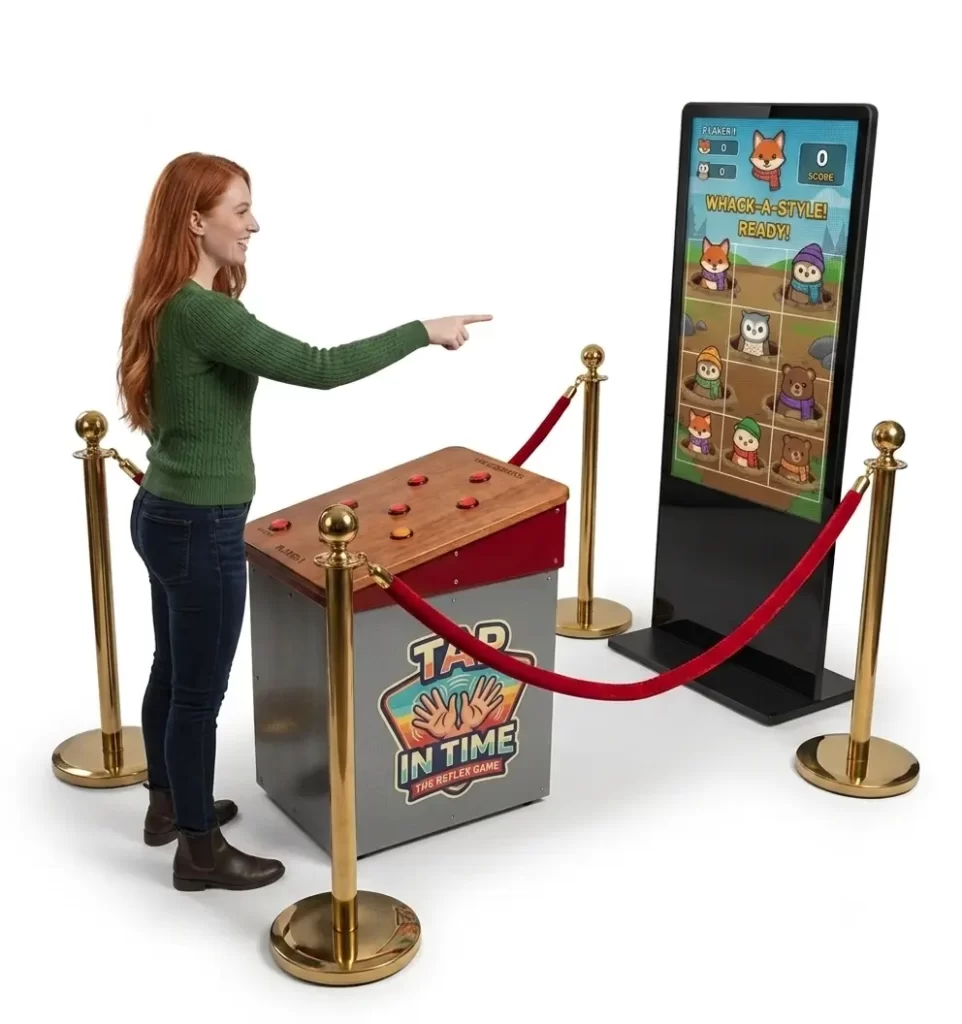
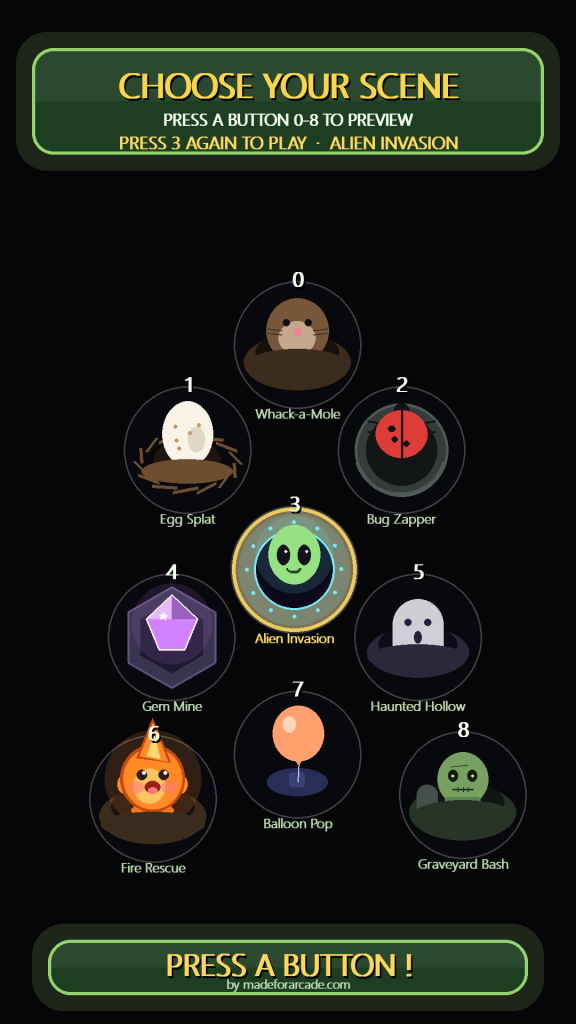
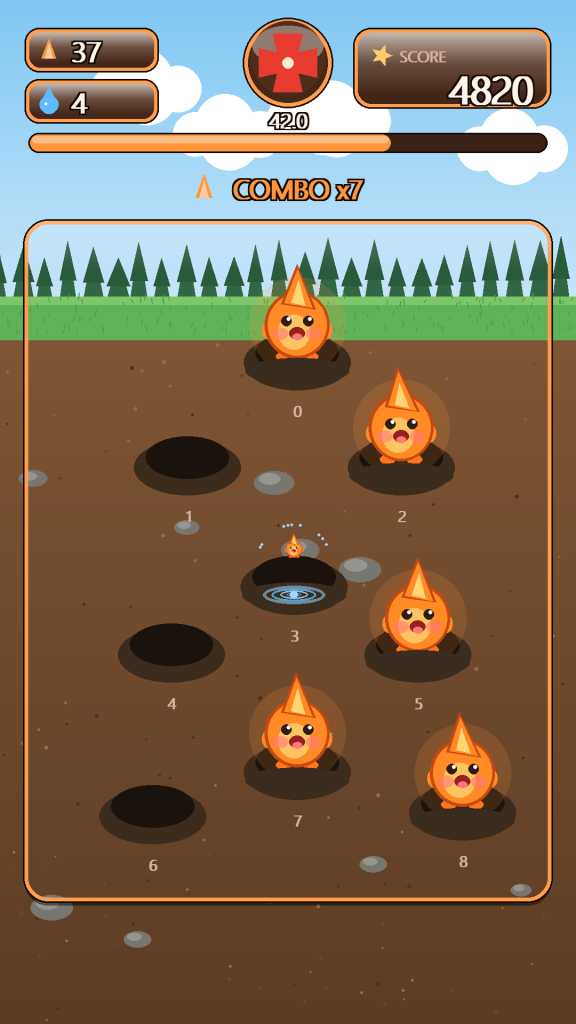
Gather instant crowds at your event with this tap in time whack a mole style arcade machine, entertain and capture visitor contact information automatically. 9 different game themes turn physical play into a crowd-pulling competition. Fully automated, plug-and-play and can run unattended so your staff can engage in other activities, it services 20–50 players per hour and runs on any windows OS system. Small footprint, no moving parts, fully brandable — built in-house for trade shows, brand activations, fitness clubs and events. No computer screen ? Add our 55″ 4K touchscreen display kiosk with windows operating system for a full and seamless pre-programmed plug and play experience. Best of all : you can also use the touchscreen kiosk for other promotions and events.
Whack a mole just got a whole lot better. This exhibition console with large 55″ touchscreen kiosk features 9 exciting speed games that are easy to understand yet irresistable to pass by without playing.
Visitors simply step up to the console and select their preferred game style. The challenge reads instantly, so there’s no learning curve and no host needed — players understand the game the moment they see it, and spectators gather to watch. Built for B2B environments, it’s engineered for reliability, throughput, and minimal supervision, handling 20–50 players per hour for high-traffic settings like trade shows, exhibitions, fitness clubs, and public events.
Nine modes keep it fresh for every audience, and a built in leaderboard that keeps track of daily and all-time high scores so visitors compare, compete and come back for more. Results land on a large 55″ 4K screen that pulls eyes from across the room.
Why it works on the floor
Active games work harder. Physical gameplay stops people in the aisle, and competitive scores keep them watching — the kind of buzz that builds dwell time and gets visitors to engage with you directly. Because each game cycle runs just 30–60 seconds, you move many participants through per hour while the leaderboard fuels rematches. The visual feedback and competitive scores naturally encourage photos / video and social media sharing, so the experience becomes content people post and talk about long after the event. Performance metrics are captured for leaderboards, competitions, and campaigns, turning attention into measurable participation.
Fully branded, built in-house
Because MadeforArcade designs and builds this machine 100% in-house, it can be fully customised and branded for you. Graphics and colours match your campaign or sponsor, and a large engaging billboard area can carry your product, logo or call to action — ideal for sports, energy, and lifestyle activations. Want to go further? Just about everything on the machine can be adjusted or modified as a custom-build option. It’s a buy-once brand asset you can redeploy across trade shows, festivals, product launches, and roadshows.
Set it up and let it run
It does not get simpler: plug and play, around 5 minutes from power to first player, with fully automated unattended gameplay so your staff stay free to do what they do best. The footprint is small but the impact is enormous. Place the console anywhere within 2 metres of the touchscreen totem plug it in and you instantly draw a crowd . Catchy music and effects, colourful animations, and a high-score memory system builds a competitive experience for players of all ages. And it’s reliable by design: no moving parts to break down, every player interaction is simple, and the electronics are robust. Technical staff is always available for questions and support.
Get the attention your activation needs and take the data with you. GDPR-compliant lead-capture is available as an option, alongside full branding and custom modifications.
game consists of : free standing console with pushbutton panel, control unit/microprocessor, power supply, 55″ touchscreen kiosk with windows OS (optional) fully pre-programmed plug and play.
This EC Declaration of Conformity (Annex II.1.A, Machinery Directive 2006/42/EC) confirms that the Interactive Jump Rope Arcade Machine – Air Time Fitness Game for Events, Gyms & Brand Activations, manufactured by Made for Arcade B.V., Besterdstraat 9a, 5051HH Goirle, Nederland, complies with the relevant provisions of the Machinery Directive 2006/42/EC, EMC Directive 2014/30/EU and RoHS Directive 2011/65/EU.
Harmonised standards applied: EN ISO 12100:2010, EN IEC 61000-6-1, EN IEC 61000-6-3, EN IEC 63000. The technical file is held by the manufacturer at the address above.
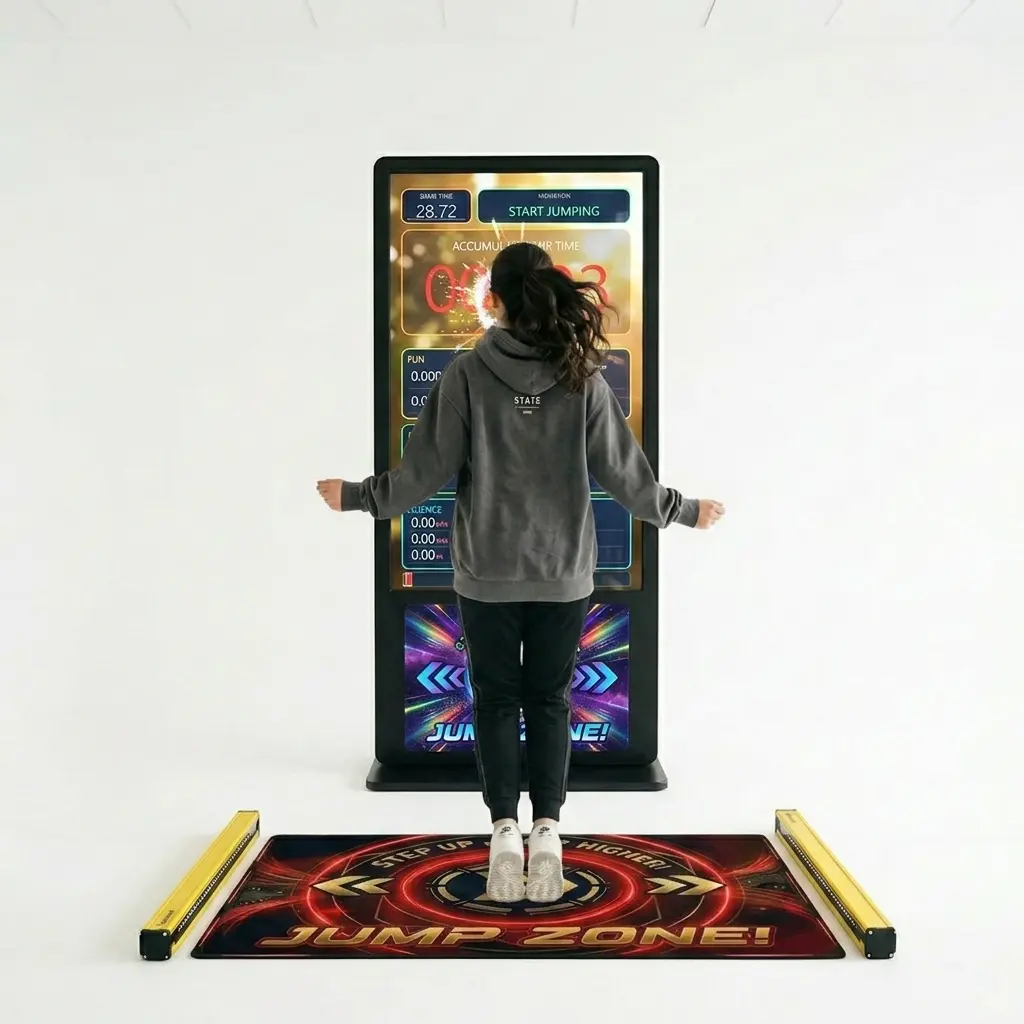
The fully-automated, touch-less fitness arcade that measures real jump
air-time and turns physical play into a crowd-pulling competition — on a 55″ 4K portrait touchscreen kiosk.
Plug & PlayUnattended Operation3 Game Modes20–50 players / hourAuto-Start Kiosk
1 What’s in the box
Your Jump Rope Simulator ships as a complete, ready-to-run package. Check that all parts are present before installation.
Display
55″ 4K Portrait Kiosk
Large vertical touchscreen monitor in its stand, with a Windows PC that boots straight into the game.
controller
Infrared Sensor Array
Touch-less beam unit that detects every jump with millisecond precision. No moving parts.
Sensor
Control box
The intelligent heart of your machine measuring jumps, calculating height,speed,rythm etc. .
Play Area
Jump Mat
Marks the play spot and works with the sensor to know when a player is in position.
Software
Game USB Stick
Contains the game, media and your high-score data. Pre-installed and set to auto-start.
Power
Power & Cables
Mains lead for the kiosk plus the sensor connection cable.
Keep the USB stick in place. The game, all music/video and the high-score records live on it. If it is removed the kiosk cannot start the game.
2 Quick start in 5 minutes
Position the kiosk & matPlace the touchscreen kiosk where it is clearly visible. Lay the jump mat in front of it, within 2 metres of the sensor.
Connect the sensorPlug the infrared sensor array into the kiosk PC (USB). Point it across the jump area so the beam crosses where the player will jump.
Plug in powerConnect the kiosk to mains power.
Switch onPress the power button. Windows starts and the game launches automatically into the attract screen — no login or menus needed.
Play!When you see “STEP ONTO THE MAT TO START”, you’re live. A short status bar may show for 30 seconds while the sensor connects, then fades away.
That’s it. Set-up typically takes 5–15 minutes. The machine is designed to run unattended all day.
3 Installation & placement
Choosing a spot
The 55″ 4K screen is designed to draw a crowd, so place it where passers-by can see both the screen and people playing. Allow clear, safe space around the mat for a jumping player and a few spectators.
Sensor & mat alignment
The jump area and sensor can be placed anywhere within 2 metres of the kiosk. Aim the infrared beam so it crosses the player’s body at jump height. When the player is standing on the mat the game shows the player as detected; when they leave, it clears.
Avoid strong direct sunlight or other infrared sources pointed at the sensor — they can interfere with beam detection. Indoor or shaded placement is best.
First power-on check
On boot you should reach the colourful attract screen. The small status line at the top-left shows the sensor connection for the first 30 seconds and then fades. If it reads “connected”, you are ready.
4 How to play
Step onto the matThe game detects the player and begins a short countdown.
Stay on the mat for the countdownHold position until “GO!”. Stepping off too early shows “STEP BACK ON THE MAT!” — hop back on in time and the countdown continues.
Jump!Make smooth, steady jumps for the duration of the round (30 seconds by default). The screen shows live air-time, jump count, height, speed and a style grade.
See your resultsWhen time is up, your achievements appear. Beat a leaderboard score and you’ll be invited to enter your initials.
Next playerThe screen returns to the attract loop, ready for the next jumper.
Coaching tip for guests: small, steady, rhythmic hops score the best style grade and avoid the “hop smaller” air-time penalty. It’s about rhythm, not big leaps.
5 Game modes & metrics
Every round captures the same rich data, presented through three themed lenses so the game appeals to casual players, fitness fans and the data-curious alike.
Mode
🎉 FUN
Rhythm & style focus — total air time, best jump and a live A+ to G style grade.
Mode
💪 FITNESS
Effort & endurance — total jumps, highest jump and your live leaderboard ranking.
Mode
🔬 SCIENCE
The physics — take-off speed (m/s), average speed and total vertical distance travelled.
What gets measured
Metric
Meaning
Accumulated air time
Total time spent off the ground during the round.
Best jump
Longest single jump (air time) of the round.
Total jumps
Number of clean jumps completed.
Highest jump
Greatest jump height, calculated from air time.
Take-off speed
Launch speed in metres per second.
Average take-off speed
Mean launch speed across all jumps.
Total distance travelled
Combined up-and-down vertical distance over the round.
6 Scores, style grades & leaderboards
Style grade
While playing, a live grade from A+ (PERFECT) down to G (WARM-UP) rates how steady and rhythmic the jumps are. A plain-word label appears under the letter so the grade is clear to everyone, including colour-blind players.
Leaderboards & initials
The machine keeps an all-time leaderboard and a “Today” leaderboard that resets automatically each morning, so there is always a fresh competition to win. Land a top-10 score and an on-screen keyboard invites the player to enter three initials — classic arcade style, fully touch-operated.
Daily reset: the “Today” board rolls over overnight, giving repeat visitors a new chance to top the chart each day. All-time records are kept alongside it.
Abnormal jump protection
If the beam is blocked for too long (an unusually long “air time”), the game shows “TOO LONG IN THE AIR — HOP SMALLER!” and applies a small time penalty. This keeps scores fair and honest.
7 The attract loop
When nobody is playing, the kiosk runs an eye-catching attract loop to pull players in: an animated title, the FUN / FITNESS / SCIENCE high-score pages, the named leaderboard, and the game rules — all over a randomly chosen background video with attract music. After a few minutes idle, the screen gently dims to protect the panel and instantly wakes when a player steps up.
8 Operator / admin panel
Operator settings are hidden behind a secret gesture so the public cannot reach them. There are two ways to open the admin panel, both from the idle attract screen:
Touchscreen
5 taps in the corner
Tap the top-left corner of the screen 5 times quickly. A numbered ring confirms each tap; on the 5th, the admin panel opens.
With a mouse
Wiggle & click
Move the mouse left–right–left–right, then click the round ADMIN button that appears in the top-left corner.
What you can change
Setting
Range
Purpose
Game time
10–120 s (default 30)
Length of each round.
Music volume
0–10
Background music level.
SFX volume
0–10
Sound-effects level.
Attract audio
On / Off
Music while idle (mute for quiet venues).
Reset high scores
Confirm
Wipes all leaderboards (two-tap confirm; cannot be undone).
Tap CLOSE to save and return to the game. All settings are remembered between power-cycles.
Keyboard shortcuts (if a keyboard is attached):– / = music volume down / up ·
[ / ] SFX volume down / up. These work even during a game.
Play analytics
Every completed round is logged to jumprope_play_log.csv on the USB stick (date, time, jumps, scores). Open it in Excel to see plays per day and your busiest hours.
9 Customising music & video
You can freshen the look and sound without any technical know-how. On the USB stick are three folders:
Folder
What goes in it
background_animation
Background videos (.mp4). One is chosen at random for each game and across the attract loop.
game_music
Music tracks (.mp3) played during rounds.
attract_music
Music played while the machine is idle.
Drag & drop, that’s all. Drop new files into a folder and they are automatically added to the random rotation next time the game starts. To remove a clip from rotation without deleting it, move it into a sub-folder named hide.
For brand activations, replace the background videos with your own promo clips and add your jingle to attract_music to turn the kiosk into a branded experience.
10 Maintenance & care
Screen
Wipe the touchscreen with a soft, dry or slightly damp microfibre cloth. No harsh solvents.
Sensor lens
Keep the infrared sensor lens clean and unobstructed for reliable detection.
Mat
Wipe down between busy sessions; keep it flat and free of trip hazards.
Shutting down
To power off cleanly, attach a keyboard and press Esc, then shut down Windows.
Back up your records. Occasionally copy jumprope_highscores.json and jumprope_play_log.csv from the USB stick to keep a safe copy of scores and analytics.
11 Troubleshooting
Symptom
Try this
Game doesn’t start on boot
Make sure the USB stick is inserted. Restart the kiosk. If needed, double-click launch_jumprope_v20.bat on the stick.
Jumps not detected
Check the sensor cable, clean the lens, re-aim the beam across the jump area, and avoid direct sunlight. The status line should read “connected”.
“Waiting / no serial”
The sensor isn’t connected. Re-seat its USB cable; the game auto-reconnects within a few seconds.
No sound
Open the admin panel and raise music/SFX volume; confirm “attract audio” is On for idle music.
Always the same background video
Add more .mp4 files to background_animation; the game rotates through all of them.
Can’t find admin settings
From the idle screen, tap the top-left corner 5 times quickly (see section 8).
Screen looks dim while idle
Normal power-saving after a few minutes of no play. It brightens instantly when someone plays.
12 Technical specifications
Specification
Detail
Display
55″ 4K touchscreen, portrait (9:16)
Sensor
Infrared, touch-less, millisecond resolution
Game duration
30 seconds (adjustable 10–120 s)
Capacity
20–50 players per hour
Dimensions
100 × 200 × 80 cm (approx.)
Weight
~60 kg
Power
110–240 V / 50 Hz
Operating system
Windows, game in auto-start kiosk mode
Set-up time
~5–15 minutes, plug-and-play
Maintenance
No moving parts; touch-less interaction
13 Safety
Clear the area
Keep the jump zone free of obstacles and ensure secure footing on the mat.
One jumper at a time
The game is designed for a single player on the mat per round.
Play within limits
Encourage warm-ups and sensible effort. Players exercise at their own pace.
Keep it dry
Indoor use only. Keep electronics and cabling away from water.
Need a hand?
For support, spare parts, branding options or volume orders, visit
madeforarcade.com.
Jump Rope Simulator — made for arcade. Bring fitness, fun and friendly competition to any space.
Specifications may vary or change over time. Verify all specifications prior to purchase. No rights can be derived from this information.
Questions
Can it be branded with our design?
Yes — most machines can be branded by our design department per your specifications. Simply send your artwork and our team will go to work for you, delivering a turn-key custom-branded solution.
Do you provide warranty on your machines?
Absolutely! Each machine comes standard with a 1-year full service and parts warranty at any of our service centers, no questions asked. You can extend warranty to a full 2 years by clicking the option box above (highly recommended). See our T&C for details.
Do you ship to my country?
Yes — for sales we ship worldwide; for rentals we prefer to limit shipping to Western Europe. And if you have your own carrier account (FedEx, DHL, etc.) you can always arrange to have your order picked up from our service centers.
How are products packed?
For trucking, train or air cargo, crating is needed — check the option box above to add the custom wooden protective crating the carrier requires. If you arrange your own pickup, crating is optional and may save you the cost of having a custom frame built.
Do you offer volume or bundle pricing?
We do. For multiple machines, recurring events or a tailored package, request a quote and we’ll put together the sharpest price.
Can we see it in action first?
Many machines have a demo video on this page, and you’re welcome to see one running at our Goirle service center by appointment.