

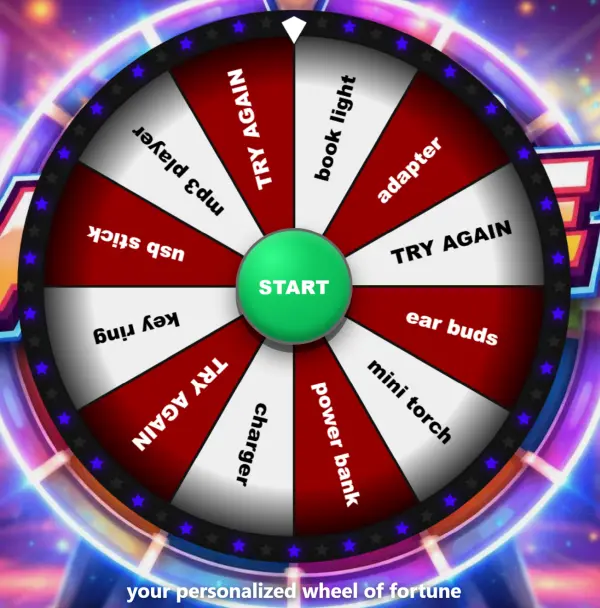
A fully customisable Digital Prize Wheel that turns any screen into a crowd-pulling, brandable attraction — spin it from a tablet, mirror it to the big screen, and run it anywhere in the world.
This is a software-driven wheel of fortune, not a mechanical rig — there are no physical parts to ship, maintain or set up. All you need is an internet-enabled device and you are ready to go. Add your own products and prizes, then make live changes from a settings panel that pushes instantly to every connected display.
Why it works on the floor
A spinning wheel is an irresistible draw — it stops foot traffic, gathers a crowd and gives staff a natural reason to start a conversation. The same wheel can be opened on multiple screens, tablets or phones around the world, so anyone with the URL and password can follow the action live. That live, synchronised spin extends your reach far beyond the booth itself and turns every win into a moment people want to watch and share, while you tie each spin to whatever campaign goal you have — lead capture, instant-win giveaways or product reveals.
Your wheel, your brand
Made to match your product, brand or style. Colours, lights, motion, background image and the win-chance per product are all adjustable, and you place new products straight from the panel. Every change you make in the administrator panel is instantly updated across all displays — no difficult setup and no advanced ICT degree needed. Custom branding is available so the wheel arrives looking like your campaign, not a stock template.
Set it up your way
Start it in Amsterdam – spin it in Berlin. An all-in-one setup uses one device and one URL with the start button in the centre of the wheel, so you can run everything from a tablet or touchscreen and cast or mirror to a larger display — ideal for trade shows and quick setups. A remote-control setup uses two devices and two URLs: one screen shows the wheel, the other shows a separate start button, so the operator can trigger the spin from a different location and keep the main screen clean. Either way you get simple setup, full flexibility and live synchronisation across every device.
Also known as a digital wheel of fortune, interactive spin game or virtual prize wheel — built for continuous public use at trade shows, retail promotions, product launches, exhibitions and lead-capture campaigns.
Custom branding and full personalisation are available as an option, with adjustable win-chance per product and unlimited simultaneous viewers.


 English
  French
  German
  Spanish
  Italian
  Dutch
Dutch  Portuguese
  Polish
  Bulgarian
  Swedish
  Romanian
  Danish