
- batak reflex reaction and speed game 3 in 1 – ex rental sale
- Reaction Tower Batak Style Reflex Game for Events, Trade Shows & Brand Activations – rental
- reaction tower speed trainer , batak reflex game , light chaser – 6 in 1 premium
- reflex reaction and speed game strike a light professional – 6 games in 1 – plug and play
- speed challenge game strike a light professional – 6 in 1 batak premium ** RENTAL **
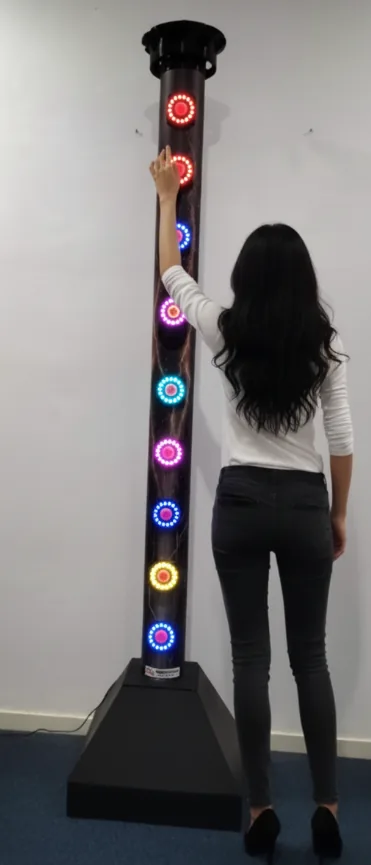
The Turbo Tower (also sold as the Reaction Tower and the Strike-a-Light Professional) is a speed-and-reaction game with illuminated target buttons and several built-in game modes — the premium model offers six, the 3-in-1 model three. It comes in two shapes that share the same controller and game logic: a tall standing tower and an octagon frame. This manual covers safe use, the power supply, the controls, the start-up self-test, the games and the settings menu.
Caution: stand the machine on a flat, stable surface. Use only a stable 5 V / 2 A USB supply; an under-powered supply can overheat the machine and is not covered by warranty.
Disclaimer
Made for Arcade makes no representations or warranties with respect to this manual and, to the maximum extent permitted by law, expressly limits its liability for any failure to conform to any warranty resulting from the replacement of this manual with another. In addition, Made for Arcade reserves the right to revise this publication at any time without obligation to notify any person of the revision.
The information in this documentation contains general descriptions and/or technical characteristics of the performance of the machine mentioned in this documentation. This documentation is not intended as a substitute for, and should not be used to determine, the suitability or reliability of this machine for specific user applications.
It is the duty of such user or system integrator to carry out — in relation to the relevant specific application or use of the product — an adequate and complete risk analysis, evaluation and testing of the products.
Please note: all images used in this manual are for illustrative purposes only and may differ from the actual product. This is because the colours, dimensions and other properties of the actual product may differ from the image.
Made for Arcade and/or its affiliates or subsidiaries are not responsible or liable for any misuse of the information contained in this document. If you have any suggestions for improvements or changes, or have found any errors in this documentation, please let us know.
All relevant national, regional and local safety regulations must be followed when installing and using this machine. For safety reasons and to ensure compliance with the documented system data, the components may only be repaired by the manufacturer.
If machines are used for applications with technical safety regulations, the relevant instructions must be observed. Failure to observe this information may result in personal injury and/or damage to the machine.
This machine is intended for entertainment purposes only. It is not intended for use for profit, for the wagering or payout of money, or for gambling or games of chance. Made for Arcade makes no representation or warranty that the use, installation or operation of this machine is permitted or lawful in any particular region, country, jurisdiction or venue. It is the sole responsibility of the buyer and/or end-user to ensure that their use of the machine complies with all applicable laws, regulations and licensing or permit requirements (including any gambling, gaming or amusement regulations).
Copyright
Copyright © Made for Arcade. All rights reserved. No part of this documentation may be reproduced, distributed or transmitted in any form or by any means, including photocopying, recording, or other electronic or mechanical methods, without the prior written permission of the publisher. Send a request to the publisher for permission.
Other languages
This is the English user manual (or an automatic translation thereof). Manuals in other languages may be available on request.
Power supply and surge protection
Arcade and entertainment machines are computer-controlled and contain sensitive electronics. Mains power at events, venues and even ordinary outlets is frequently unstable or “dirty” — voltage spikes, surges, sags and brown-outs, flicker, overloaded or shared circuits, generators, long extension runs and the switching of nearby equipment can all push the supply outside the machine’s safe operating range.
You must always connect the machine through a good-quality surge protector, and — wherever the supply is unreliable or the machine must not lose power unexpectedly — through an uninterruptible power supply (UPS). These sensitive machines cannot tolerate power spikes, surges, brown-outs or sudden cut-offs.
Damage, data loss or malfunction caused by power-supply problems is not covered by warranty. Failure to use adequate power protection can lead to machine malfunction and, in some cases, a risk of fire or bodily harm. If you are unsure about your power supply, consult a qualified electrician before use.
Duty cycle and cooling breaks
These machines are built for event and venue use, not uninterrupted operation. Their motors, power supplies, controllers and lighting generate heat, and running continuously lets that heat build up beyond the safe operating range. Do not run the machine continuously for more than 4 hours. After every 4 hours of use, switch it off completely for at least 10 minutes, by disconnecting the power supply, to let the components cool before resuming.
Overheating from exceeding this duty cycle can cause reduced performance, premature wear, component failure and, in some cases, a risk of fire or bodily harm. Damage or malfunction resulting from continuous operation beyond these limits, or from inadequate cooling breaks, is not covered by warranty. Always keep air inlets and outlets clear and unobstructed.
Support and service
For more information, service, technical support, ordering user manuals, or for any other questions, please contact:
Made for Arcade
Besterdstraat 9a, 5051HH Goirle, The Netherlands
Email: [email protected] · Web: madeforarcade.com
Machine description
The Turbo Tower is a speed and reaction game with various built-in features and settings. The user selects games through the built-in menu and can influence play by toggling options on and off in the user menu. Whichever shape you have, the playing field is a set of illuminated target buttons plus one menu/centre button, and every game, setting and start-up step in this manual works identically.
The two versions
The machine is sold in two shapes. Both run the exact same controller and game logic — only the frame the targets are mounted on differs, so the controls, start-up, games and settings menu are identical for both.

Intended use
The Turbo Tower is intended for domestic entertainment use and is not designed or intended for commercial use. It must never be left in operation unattended — always supervised by a competent adult. Never run it for more than 4 hours at a time; after a maximum of 4 hours, disconnect it from the power supply for at least 20 minutes. The minimum age for use is fourteen; underage players should only use the machine under adult supervision.
Risks when using the machine
Using the machine may involve risks. Before use, ensure everyone involved understands the risks and the machine’s limitations. The machine is never 100% predictable, so a competent adult must always supervise and be able to intervene. Never run it for more than 4 hours at a time (then switch it off, plug removed, for at least 30 minutes). Press the targets firmly but do not lean, hang or strike the frame with excessive force.
Unpacking and preparation
- Remove the Turbo Tower from the wooden or steel crate (if applicable).
- Remove all packaging materials such as foam, plastic or cardboard.
- Place the machine on a flat, level surface and make sure the USB power cord is not a tripping hazard.
- The standing tower has an integrated base and the octagon stands on its own rolling frame — neither needs added ballast. On the octagon, lock the castors before play.
Commissioning
The Turbo Tower operates on 5 volts / 2 amps. Use only a short-circuit-proof USB adapter (or batteries) that provides a stable 5 V at at least 2 A without ripple — most phone chargers meet this. Inspect the machine and cord for defects or damage and do not connect anything damaged. After checking, plug the USB cord into the back/bottom of the machine; it starts automatically (you may hear a noise at start-up).
Caution — power supply: ensure the supply can always deliver full current. If it can’t, the built-in boost converter tries to compensate, driving high currents through the machine that can cause damage, overheating or fire. Always ensure at least 4.9 V is available; if needed, use a USB power/voltage meter between the supply and the machine. Damage from an incorrect power supply is not covered.
Operation of the machine
The playing field has several illuminated buttons (targets) that light up depending on the selected game; each target must be pressed quickly or in a specific order (see the game modes). A menu button on the playing field is used to select game modes or change settings.
Decommissioning the machine
Disconnect the machine from the power supply completely. Do not leave it unattended while connected to the power supply.
Periodic maintenance
Service the machine every 4 hours of use, or at least once a week for light use.
Visual inspection of wiring and mechanisms
Check all (internal) parts and cables for damage, breakage or abnormal behaviour — energetic play can jam buttons or pull on cables and mechanisms. Always disconnect the power before working inside.
Buttons and operation
- Menu button (directly below the screen, centre of the machine): short press = start game / confirm selection; long press = go to settings.
- Target buttons (the other buttons in the tower): press the correct target to score in games; press any target to select games in the game menu; in the user menu, press a red-lit target to increase a value or a green-lit target to decrease it.
Startup procedure
When powered, the machine starts automatically and runs through:
- The welcome screen is shown.
- Intro music plays.
- An internal check runs — all targets light red, then green, then blue. (Hold the menu button down during this to jump straight into the settings menu.)
- All targets light orange together for a self-test — press every button one by one to continue; each press dims that target, confirming the button and logic work. If no button is pressed, the self-test is skipped after 10 seconds.
- Standby (attract) mode: the machine waits for a player and shows light patterns to attract attention.
Game menu — choose from 6 games
In attract mode, long-press the menu button until the screen prompts you to release it. Press any target button (not the menu button) to cycle through the options (1-2-3-4-5-6-7-1-2-3…):
- Game 1: reaction mode
- Game 2: match the colour
- Game 3: match the pattern
- Game 4: bouncing hunt
- Game 5: up and down
- Game 6: 2 in order
- Option 7: user settings
When a game is shown, confirm by briefly pressing the menu button — you return to attract mode and can start the game by pressing the menu button again.
Game variations explained
In every game, targets stay lit for a shorter time as the game speeds up. If you collect more points than set in the user menu before the timer reaches zero, you get a win screen — otherwise a loss screen.
Game 1 — reaction mode
A random target lights up; press it as fast as possible to score. If you miss it in time, a new target is chosen. Wrong presses or misses don’t deduct points.
Game 2 — match the colour
A ring around the menu button lights a random colour and every target gets a random colour. Find and press the target matching the menu ring’s colour as fast as possible. Wrong presses or misses don’t deduct points.
Game 3 — match the pattern (difficult)
A coloured pattern lights around the menu button and each target gets a random pattern. Press the one target whose pattern matches (note: patterns on the targets can be rotated, and only one matches at a time). A wrong press deducts 1 point; a miss deducts nothing.
Game 4 — bouncing hunt (intense)
The top target lights, then each one below in order to the bottom, then back up — you know which is next, so it’s fast-paced and you constantly chase up and down. Wrong presses or misses don’t deduct points.
Game 5 — up and down (mostly)
Top target lights, then bottom, then top, then bottom… but sometimes another target is secretly lit, so watch for deviations. A wrong press deducts 1 point, and a miss also deducts a point.
Game 6 — 2 in order
Two targets flash quickly — first blue, then red — then go dark. Repeat the two in the correct order as fast as possible; once correct, two new targets appear. This tests your field of vision and concentration. Wrong presses or misses don’t deduct points.
User menu settings
Two ways to enter the user menu: (1) during start-up, while the targets flash red/green/blue, hold the menu button until the screen says to release it; (2) during attract mode, hold the menu button until the screen says to release it. Press any target button (not the menu button) to select menu options, choose option 7 (Settings), and confirm with the menu button.
When setting a value, one target ring turns red and one turns green: red target = value −1, green target = value +1, menu button = confirm and go to the next option.
| Setting | Description | Range |
|---|---|---|
| SFX volume | Volume of the effect sounds | 0–10 |
| Music volume | Volume of the background music | 0–26 |
| Game time | How long a game lasts (seconds) | 20–120 |
| Winning score | Points needed to win | 2–99 |
Troubleshooting
| Problem | Solution |
|---|---|
| Machine does not start | Check there is a 5 V / 2 A supply; battery empty? wrong supply voltage? |
| Buttons react strangely | Supply voltage too low — use a supply that delivers at least 2 A at 5 V. |
| The game goes way too fast | Game time in settings is very short, which makes the game accelerate quickly — extend the game time. |
| I don’t hear any sound | Turn up the SFX volume (effects) and/or the music volume. |
Precautionary measures
The machine is intended for indoor use only and is not designed for outdoor installation. When installing indoors, avoid:
- Wet areas.
- Flammable materials.
- Uneven surfaces.
- Blocking emergency exits, fire extinguishers or other emergency equipment — keep them easily accessible.
- Places with heavy vibration.
Do not make any modifications to the machine, and always switch it off during maintenance or when leaving it unattended — ensure the power supply is completely disconnected — to prevent electric shock or short circuit.
 English
  French
  German
  Spanish
  Italian
  Dutch
Dutch  Portuguese
  Polish
  Bulgarian
  Swedish
  Romanian
  Danish