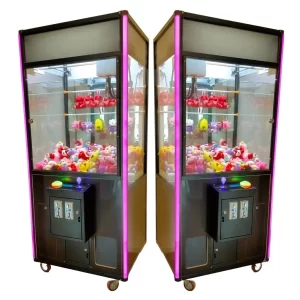
A gashapon capsule vending machine with a built-in video screen — the highest-converting dispenser in our GashaGold series. Insert a USB stick to play your promo reel while visitors grab a surprise capsule, turning waiting time into engagement, brand recall and a frictionless giveaway. Holds 70 capsules at 75 mm or 35 at 100 mm, runs standalone or slots into a full modular vending wall.
A gashapon capsule vending machine with a built-in video screen — the highest-converting dispenser in our GashaGold series, designed to grab attention, tell your story and put a branded surprise in every visitor’s hand.
The built-in video display does the talking for you. Simply insert your USB stick and tell your story — the moment a visitor’s eyes lock onto the screen, your message lands automatically. While they watch, they grab a surprise capsule, so they learn about your business and walk away holding something tangible at the same time.
It’s part of our modular GashaGold system, so it works as a standalone attraction or slots straight into a full vending wall as your stand grows.
Why it converts on the floor
These dispensers add real value anywhere your audience has a moment to wait — converting idle seconds into impulse engagement. Waiting lines near cash registers, cloakrooms, reservation areas, waiting rooms, restaurants, car washes, gas stations, game halls and hundreds of other places all become touchpoints. Instead of a captive but bored crowd, you get dwell time that works for you: the screen delivers your pitch, the capsule gives people a reason to step closer, and the surprise inside becomes a moment they remember — and often share. Load it with branded capsules or product samples and every drop doubles as a frictionless giveaway and a brand-recall hit. Buy it once and it keeps earning attention event after event.
Built to hold a crowd — and the capsules
The machine takes both 75 mm and 100 mm capsules, holding 70 capsules at 75 mm diameter or 35 capsules at 100 mm diameter, so you can match capacity to whatever you’re handing out. The cabinet is metal, weighs 25 kilograms and measures 520 × 395 × 685 mm, running on standard 220 volt / 50 Hz power — a solid, self-contained unit that looks the part on any stand. The USB-loaded video screen makes it your screen to own, ready for your promo reel, product story or call to action.
Also known as a gashapon machine, gacha capsule dispenser or capsule toy vending machine with video screen.
Available standalone or integrated into a full modular vending wall.
This EC Declaration of Conformity (Annex II.1.A, Machinery Directive 2006/42/EC) confirms that the gashapon capsule vending machine with video screen - gashagold series, manufactured by Made for Arcade B.V., Besterdstraat 9a, 5051HH Goirle, Nederland, complies with the relevant provisions of the Machinery Directive 2006/42/EC, EMC Directive 2014/30/EU and RoHS Directive 2011/65/EU.
Harmonised standards applied: EN ISO 12100:2010, EN IEC 61000-6-1, EN IEC 61000-6-3, EN IEC 63000. The technical file is held by the manufacturer at the address above.
The capsule (gashapon) vending kiosk dispenses capsules when the player inserts a coin and turns the wheel. This manual covers safe use, set-up, operation, the coin acceptor and the settings menu (including the alternative PCB menu on machines with the original internals).
Caution: never leave the machine running unattended, and never run it for more than 10 hours continuously. After a maximum of 10 hours, switch it off (unplugged) for at least one hour.
Disclaimer
Made for Arcade makes no representations or warranties with respect to this manual and, to the maximum extent permitted by law, expressly limits its liability for any failure to conform to any warranty resulting from the replacement of this manual with another. In addition, Made for Arcade reserves the right to revise this publication at any time without obligation to notify any person of the revision.
The information in this documentation contains general descriptions and/or technical characteristics of the performance of the machine mentioned in this documentation. This documentation is not intended as a substitute for, and should not be used to determine, the suitability or reliability of this machine for specific user applications.
It is the duty of such user or system integrator to carry out — in relation to the relevant specific application or use of the product — an adequate and complete risk analysis, evaluation and testing of the products.
Please note: all images used in this manual are for illustrative purposes only and may differ from the actual product. This is because the colours, dimensions and other properties of the actual product may differ from the image.
Made for Arcade and/or its affiliates or subsidiaries are not responsible or liable for any misuse of the information contained in this document. If you have any suggestions for improvements or changes, or have found any errors in this documentation, please let us know.
All relevant national, regional and local safety regulations must be followed when installing and using this machine. For safety reasons and to ensure compliance with the documented system data, the components may only be repaired by the manufacturer.
If machines are used for applications with technical safety regulations, the relevant instructions must be observed. Failure to observe this information may result in personal injury and/or damage to the machine.
This machine is intended for entertainment purposes only. It is not intended for use for profit, for the wagering or payout of money, or for gambling or games of chance. Made for Arcade makes no representation or warranty that the use, installation or operation of this machine is permitted or lawful in any particular region, country, jurisdiction or venue. It is the sole responsibility of the buyer and/or end-user to ensure that their use of the machine complies with all applicable laws, regulations and licensing or permit requirements (including any gambling, gaming or amusement regulations).
This is the English user manual (or an automatic translation thereof). Manuals in other languages may be available on request.
Power supply and surge protection
Arcade and entertainment machines are computer-controlled and contain sensitive electronics. Mains power at events, venues and even ordinary outlets is frequently unstable or “dirty” — voltage spikes, surges, sags and brown-outs, flicker, overloaded or shared circuits, generators, long extension runs and the switching of nearby equipment can all push the supply outside the machine’s safe operating range.
You must always connect the machine through a good-quality surge protector, and — wherever the supply is unreliable or the machine must not lose power unexpectedly — through an uninterruptible power supply (UPS). These sensitive machines cannot tolerate power spikes, surges, brown-outs or sudden cut-offs.
Damage, data loss or malfunction caused by power-supply problems is not covered by warranty. Failure to use adequate power protection can lead to machine malfunction and, in some cases, a risk of fire or bodily harm. If you are unsure about your power supply, consult a qualified electrician before use.
Duty cycle and cooling breaks
These machines are built for event and venue use, not uninterrupted operation. Their motors, power supplies, controllers and lighting generate heat, and running continuously lets that heat build up beyond the safe operating range. Do not run the machine continuously for more than 4 hours. After every 4 hours of use, switch it off completely for at least 10 minutes, by disconnecting the power supply, to let the components cool before resuming.
Overheating from exceeding this duty cycle can cause reduced performance, premature wear, component failure and, in some cases, a risk of fire or bodily harm. Damage or malfunction resulting from continuous operation beyond these limits, or from inadequate cooling breaks, is not covered by warranty. Always keep air inlets and outlets clear and unobstructed.
Support and service
For more information, service, technical support, ordering user manuals, or for any other questions, please contact: Made for Arcade Besterdstraat 9a, 5051HH Goirle, The Netherlands Email: [email protected] · Web: madeforarcade.com
Machine description
The gashapon vending kiosk is intended for domestic entertainment use only and is not designed for commercial use. The minimum age for use is 12 years; underage players should only use the machine under the direct supervision of an adult. The game is based on chance and on the type of objects loaded — the player cannot influence which capsule is dispensed.
Capsule / gashapon vending kiosks.
Intended use
The gashapon vending kiosk is intended for home entertainment use only and is not designed or intended for commercial use. The minimum age for use is twelve; underage players should only use the machine under adult supervision.
Unpacking and preparation
Follow the unpacking instructions carefully to avoid damage. Remove the machine from its packaging, take out the key(s), open the doors with the corresponding key, and remove any loose products from inside (prize capsules, flyers or business cards). Check the coin box as well.
Commissioning
The machine operates on 220 volts / 50 hertz. Inspect the exterior and interior of the machine and the power cord for defects or damage — open all panels and doors and check for damage or loose connections. Do not connect the machine if anything is damaged. Close and lock all doors and panels with the keys provided, plug the power cord into the back of the machine and into a suitable outlet, and switch on at the back. The machine starts automatically.
Operation of the machine
By inserting a coin, the player receives a credit. When enough credits are added, the player spins the large wheel on the front of the machine and it dispenses a number of gashapon capsules (as set in the user menu).
Decommissioning the machine
Turn off the switch on the back of the machine and remove the plug from the socket to completely disconnect the power. Do not leave the machine unattended while it is connected to the power supply.
Coin acceptor training
The coin acceptor is either empty or already trained for Made for Arcade coins. If it is empty and the machine is not set to free play, place a sample coin: push the “replace coin” slider up in the direction of the “remove backward” arrow and place a coin under the slider (see images). When a coin is inserted, the acceptor compares it with the reference coin; if they match, the coin is sent to the cash drawer and a credit is added on the display. Only use coins 18 to 29 mm in diameter and 1.6 to 2 mm thick.
The coin acceptor.
Push the slider up.
Place a sample coin under the slider.
How do I move through the menu?
The kiosk has a user menu to personalise the experience. To access it, open the door with the key, then remove the controller with buttons — be careful not to pull on the wires. Press the menu button (the middle button) while the machine is on. Use the 4 buttons on the controller to navigate:
Top (“up”): move up in the menu.
Bottom (“down”): move down in the menu.
Right (“+”): increase the value of the selected option.
Left (“−”): decrease the value of the selected option.
The controller — up / down / + / − buttons (middle button to enter/exit).
Display
1. In standby, the display shows the number of coins required for one game. 2. After successful payment, the player turns the knob/lever to receive a prize; if the knob is not turned within the set time, the capsule is dispensed automatically. 3. After the capsule comes out, the display returns to standby and shows the number of coins required again.
The display (price / standby readout).
Menu options
Menu
Description
Parameters
Menu exit
Click this with the middle button on the controller to leave the menu
—
N (coins)
Number of coins required to play a game
0000–9999
Language
Language on the display
English, Chinese, Japanese
Autotime
Number of seconds in which the knob/lever can be turned
0001–0060
Menu settings 2 — parameter list
If the original internals are still present and the menu is opened a different way, follow these instructions. Open the door at the back of the machine with the key, then press the menu button (1!) while the machine is on — the button is on the printed circuit board. A main menu appears on the display.
Select option / open menu.
Move down.
Move up.
Change parameter up.
Change parameter down.
The main menu (opened via the PCB button).
Menu structure: parameter, accounts, reset, difficulty (not used).
The menu contains: a) parameter (set coins, volume, time, language), b) accounts, c) reset, d) difficulty — not used.
Parameter menu options
Parameter
Description
1 — coin
Number of coins needed to receive a gashapon capsule
2 — volume
Set the volume between 1 and 40
3 — time
Set the maximum playing time
The parameter settings screen.
Frequently asked questions
Can I turn the music off completely? Some larger models have an internal switch to mute the sound completely; smaller models can’t be switched off completely — set the volume to 1, or unplug the lead to the internal speaker (ensuring proper electrical isolation).
Can the machine be set to “free play”? Yes — see the menu options (set the coins-per-game to 0).
Precautionary measures
The machine is intended for indoor use only and is not designed for outdoor installation. When installing indoors, avoid:
Wet areas.
Flammable materials.
Uneven surfaces.
Blocking emergency exits, fire extinguishers or other emergency equipment — keep them easily accessible.
Places with heavy vibration.
Do not make any changes to the machine without our permission, and always switch it off (as described above) during maintenance or when leaving it unattended, to avoid electric shock or short circuit.
Trade shows, Festivals & public events, In-house promotions, Roadshows
Features
LED lighting, coin comparator, settings menu , ball size adjustment, front video monitor with USB in
Contains
up to 75 caps
Specifications may vary or change over time. Verify all specifications prior to purchase. No rights can be derived from this information.
Questions
Can it be branded with our design?
Yes — most machines can be branded by our design department per your specifications. Simply send your artwork and our team will go to work for you, delivering a turn-key custom-branded solution.
Do you provide warranty on your machines?
Absolutely! Each machine comes standard with a 1-year full service and parts warranty at any of our service centers, no questions asked. You can extend warranty to a full 2 years by clicking the option box above (highly recommended). See our T&C for details.
Do you ship to my country?
Yes — for sales we ship worldwide; for rentals we prefer to limit shipping to Western Europe. And if you have your own carrier account (FedEx, DHL, etc.) you can always arrange to have your order picked up from our service centers.
How are products packed?
For trucking, train or air cargo, crating is needed — check the option box above to add the custom wooden protective crating the carrier requires. If you arrange your own pickup, crating is optional and may save you the cost of having a custom frame built.
Do you offer volume or bundle pricing?
We do. For multiple machines, recurring events or a tailored package, request a quote and we’ll put together the sharpest price.
Can we see it in action first?
Many machines have a demo video on this page, and you’re welcome to see one running at our Goirle service center by appointment.





 English
  French
  German
  Spanish
  Italian
  Dutch
Dutch  Portuguese
  Polish
  Bulgarian
  Swedish
  Romanian
  Danish