
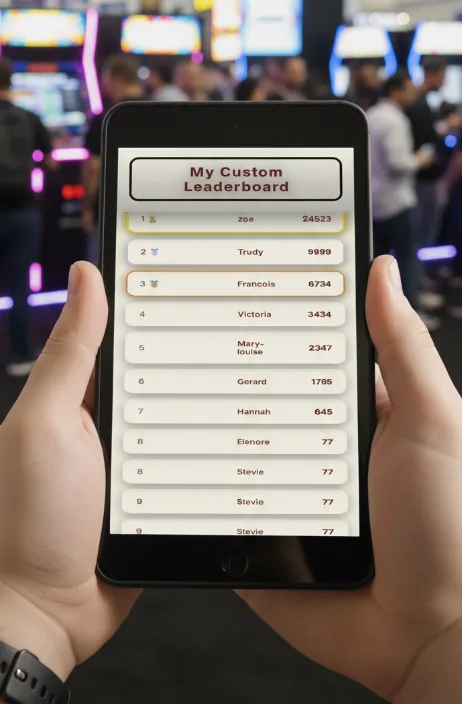
The Made for Arcade digital leaderboard is an internet-based scoring system that keeps track of players and their scores and shows them on a public web page that anyone can view through a unique URL. This manual covers what the leaderboard is for, how to activate it with your invoice number, and how to use the admin panel to add, edit and delete scores and style the public page.
Caution: the leaderboard is publicly visible to anyone with the URL — never post private or sensitive information on it. Free leaderboards may be deleted automatically from 30 days after activation, which erases all stored entries.
Disclaimer
Made for Arcade makes no representations or warranties with respect to this manual and, to the maximum extent permitted by law, expressly limits its liability for any failure to conform to any warranty resulting from the replacement of this manual with another. In addition, Made for Arcade reserves the right to revise this publication at any time without obligation to notify any person of the revision.
The information in this documentation contains general descriptions and/or technical characteristics of the performance of the machine mentioned in this documentation. This documentation is not intended as a substitute for, and should not be used to determine, the suitability or reliability of this machine for specific user applications.
It is the duty of such user or system integrator to carry out — in relation to the relevant specific application or use of the product — an adequate and complete risk analysis, evaluation and testing of the products.
Please note: all images used in this manual are for illustrative purposes only and may differ from the actual product. This is because the colours, dimensions and other properties of the actual product may differ from the image.
Made for Arcade and/or its affiliates or subsidiaries are not responsible or liable for any misuse of the information contained in this document. If you have any suggestions for improvements or changes, or have found any errors in this documentation, please let us know.
All relevant national, regional and local safety regulations must be followed when installing and using this machine. For safety reasons and to ensure compliance with the documented system data, the components may only be repaired by the manufacturer.
If machines are used for applications with technical safety regulations, the relevant instructions must be observed. Failure to observe this information may result in personal injury and/or damage to the machine.
This machine is intended for entertainment purposes only. It is not intended for use for profit, for the wagering or payout of money, or for gambling or games of chance. Made for Arcade makes no representation or warranty that the use, installation or operation of this machine is permitted or lawful in any particular region, country, jurisdiction or venue. It is the sole responsibility of the buyer and/or end-user to ensure that their use of the machine complies with all applicable laws, regulations and licensing or permit requirements (including any gambling, gaming or amusement regulations).
Copyright
Copyright © Made for Arcade. All rights reserved. No part of this documentation may be reproduced, distributed or transmitted in any form or by any means, including photocopying, recording, or other electronic or mechanical methods, without the prior written permission of the publisher. Send a request to the publisher for permission.
Other languages
This is the English user manual (or an automatic translation thereof). Manuals in other languages may be available on request.
Power supply and surge protection
Arcade and entertainment machines are computer-controlled and contain sensitive electronics. Mains power at events, venues and even ordinary outlets is frequently unstable or “dirty” — voltage spikes, surges, sags and brown-outs, flicker, overloaded or shared circuits, generators, long extension runs and the switching of nearby equipment can all push the supply outside the machine’s safe operating range.
You must always connect the machine through a good-quality surge protector, and — wherever the supply is unreliable or the machine must not lose power unexpectedly — through an uninterruptible power supply (UPS). These sensitive machines cannot tolerate power spikes, surges, brown-outs or sudden cut-offs.
Damage, data loss or malfunction caused by power-supply problems is not covered by warranty. Failure to use adequate power protection can lead to machine malfunction and, in some cases, a risk of fire or bodily harm. If you are unsure about your power supply, consult a qualified electrician before use.
Duty cycle and cooling breaks
These machines are built for event and venue use, not uninterrupted operation. Their motors, power supplies, controllers and lighting generate heat, and running continuously lets that heat build up beyond the safe operating range. Do not run the machine continuously for more than 4 hours. After every 4 hours of use, switch it off completely for at least 10 minutes, by disconnecting the power supply, to let the components cool before resuming.
Overheating from exceeding this duty cycle can cause reduced performance, premature wear, component failure and, in some cases, a risk of fire or bodily harm. Damage or malfunction resulting from continuous operation beyond these limits, or from inadequate cooling breaks, is not covered by warranty. Always keep air inlets and outlets clear and unobstructed.
Support and service
For more information, service, technical support, ordering user manuals, or for any other questions, please contact:
Made for Arcade
Besterdstraat 9a, 5051HH Goirle, The Netherlands
Email: [email protected] · Web: madeforarcade.com
Leaderboard location — quick reference
Admin panel:
madeforarcade.com/leaderboard/<INVOICE NUMBER>/admin.php
Public leaderboard URL:
madeforarcade.com/leaderboard/<INVOICE NUMBER>
Leaderboard description
The Made for Arcade leaderboard is a digital, internet-based scoring system that lets you keep track of users / players and their scores. The leaderboard automatically arranges players from high to low score and is visible to anyone worldwide through a unique URL / internet address.
When more players are added, the leaderboard automatically starts to scroll up and down to show all entries on the board. There is no maximum to the number of players you can add. When adding a lot of players, it can take longer for all the names to scroll into view.
Intended use
The leaderboard is mostly used to keep track of scoring during events. It is typically displayed on large screens or projected on walls so that players and visitors can keep track of scoring.
Risks when using the leaderboard
The leaderboard is publicly visible to anyone who has the URL. As such, you should not disclose private or sensitive information on the leaderboard.
Free leaderboards may be deleted automatically from 30 days after activation. You will then lose all stored information.
Preparing to use the leaderboard
In order to use the leaderboard you need access to the internet to enter the administration panel of the leaderboard.
In a typical setup you would also use a form of display connected to the internet to show the scoring results.
You can also share a link or QR code so that users can see the leaderboard on their phone or other internet-based device.
Activation of the leaderboard
To use the free leaderboard system you must have an invoice number for a purchase or rental from madeforarcade.com, then follow the instructions below:
- Request your personal leaderboard activation — a Made for Arcade staff member will unlock your leaderboard online and provide instructions.
- Find your leaderboard by using the invoice number from your machine purchase or rental, then visit the following URL:
madeforarcade.com/leaderboard/<INVOICE NUMBER>/admin.php
This lets you enter the administrator’s panel where you can modify your leaderboard. - Enter your password. Your password is the total price of the invoice number you just entered. In the example below the password would be “375460”. Only use digits when entering your password.

Leaderboard Admin Panel

1. Purpose
This admin panel lets you:
- Manage leaderboard entries (add, edit, delete scores).
- Control the visual appearance of the public leaderboard page.
- Preview changes live before saving.
2. Access and login
- Open
admin.phpin your browser. - You will see a login screen.
- Enter the admin password.
- After login, you reach the admin dashboard.
Top right:
- View public: opens the public leaderboard page.
- Logout: ends the session.
Adding a score
Section: Add entry
- Fill in: Name (player name) and Score (numeric score).
- Click Add.
The entry is added to the list, automatically sorted by score (highest first), and saved to disk.
Editing or deleting scores
Section: Scores. Each row has a Name field (editable), a Score field (editable), an Update button and a Delete link.
To edit:
- Change the name and/or score.
- Click Update.
To delete:
- Click Delete next to the entry.
Changes are saved immediately and the list is re-sorted by score.
Appearance settings
Section: Appearance. These settings control how the public leaderboard looks.
- Title — text shown at the top of the leaderboard.
- Background colour — pick with the colour swatch or enter a hex value (e.g. #000000).
- Text colour — same as background: pick or enter a hex value.
- Font — select one of the predefined Google Fonts from the list.
- Title size — slider: controls the title font size.
- Row size — slider: controls the font size of the leaderboard rows.
Live preview
Right side: Live Preview. It updates immediately when you change the colours, font, title text, title size or row size, and shows the top entries as an example. This preview does not save anything by itself.
Saving appearance settings
- Adjust the settings as desired.
- Click Save settings.
 English
  French
  German
  Spanish
  Italian
  Dutch
Dutch  Portuguese
  Polish
  Bulgarian
  Swedish
  Romanian
  Danish