
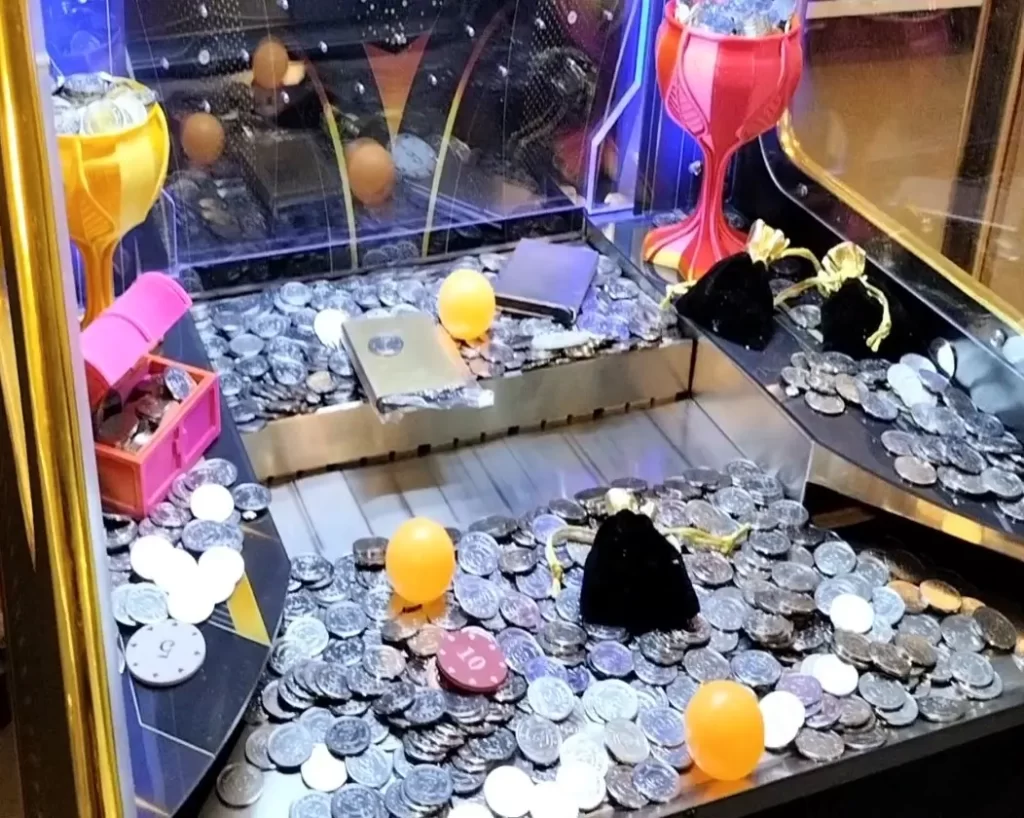
A coin pusher is a token-pushing arcade machine where dropped coins nudge a tray of tokens towards an opening; this manual covers set-up, operation, the coin acceptor and the internal controls.
Caution: This is a heavy machine — place it on a flat, stable surface; live mains is present inside whenever the doors or panels are open, so always switch off and unplug before opening.
Disclaimer
Made for Arcade makes no representations or warranties with respect to this manual and, to the maximum extent permitted by law, expressly limits its liability for any failure to conform to any warranty resulting from the replacement of this manual with another. In addition, Made for Arcade reserves the right to revise this publication at any time without obligation to notify any person of the revision.
The information in this documentation contains general descriptions and/or technical characteristics of the performance of the machine mentioned in this documentation. This documentation is not intended as a substitute for, and should not be used to determine, the suitability or reliability of this machine for specific user applications.
It is the duty of such user or system integrator to carry out — in relation to the relevant specific application or use of the product — an adequate and complete risk analysis, evaluation and testing of the products.
Please note: all images used in this manual are for illustrative purposes only and may differ from the actual product. This is because the colours, dimensions and other properties of the actual product may differ from the image.
Made for Arcade and/or its affiliates or subsidiaries are not responsible or liable for any misuse of the information contained in this document. If you have any suggestions for improvements or changes, or have found any errors in this documentation, please let us know.
All relevant national, regional and local safety regulations must be followed when installing and using this machine. For safety reasons and to ensure compliance with the documented system data, the components may only be repaired by the manufacturer.
If machines are used for applications with technical safety regulations, the relevant instructions must be observed. Failure to observe this information may result in personal injury and/or damage to the machine.
This machine is intended for entertainment purposes only. It is not intended for use for profit, for the wagering or payout of money, or for gambling or games of chance. Made for Arcade makes no representation or warranty that the use, installation or operation of this machine is permitted or lawful in any particular region, country, jurisdiction or venue. It is the sole responsibility of the buyer and/or end-user to ensure that their use of the machine complies with all applicable laws, regulations and licensing or permit requirements (including any gambling, gaming or amusement regulations).
Copyright
Copyright © Made for Arcade. All rights reserved. No part of this documentation may be reproduced, distributed or transmitted in any form or by any means, including photocopying, recording, or other electronic or mechanical methods, without the prior written permission of the publisher. Send a request to the publisher for permission.
Other languages
This is the English user manual (or an automatic translation thereof). Manuals in other languages may be available on request.
Power supply and surge protection
Arcade and entertainment machines are computer-controlled and contain sensitive electronics. Mains power at events, venues and even ordinary outlets is frequently unstable or “dirty” — voltage spikes, surges, sags and brown-outs, flicker, overloaded or shared circuits, generators, long extension runs and the switching of nearby equipment can all push the supply outside the machine’s safe operating range.
You must always connect the machine through a good-quality surge protector, and — wherever the supply is unreliable or the machine must not lose power unexpectedly — through an uninterruptible power supply (UPS). These sensitive machines cannot tolerate power spikes, surges, brown-outs or sudden cut-offs.
Damage, data loss or malfunction caused by power-supply problems is not covered by warranty. Failure to use adequate power protection can lead to machine malfunction and, in some cases, a risk of fire or bodily harm. If you are unsure about your power supply, consult a qualified electrician before use.
Duty cycle and cooling breaks
These machines are built for event and venue use, not uninterrupted operation. Their motors, power supplies, controllers and lighting generate heat, and running continuously lets that heat build up beyond the safe operating range. Do not run the machine continuously for more than 4 hours. After every 4 hours of use, switch it off completely for at least 10 minutes, by disconnecting the power supply, to let the components cool before resuming.
Overheating from exceeding this duty cycle can cause reduced performance, premature wear, component failure and, in some cases, a risk of fire or bodily harm. Damage or malfunction resulting from continuous operation beyond these limits, or from inadequate cooling breaks, is not covered by warranty. Always keep air inlets and outlets clear and unobstructed.
Support and service
For more information, service, technical support, ordering user manuals, or for any other questions, please contact:
Made for Arcade
Besterdstraat 9a, 5051HH Goirle, The Netherlands
Email: [email protected] · Web: madeforarcade.com
Machine description
The coin pusher is intended for use as entertainment in the home and is not designed or intended for commercial use. The minimum age for use is 12 years; underage players should only use the machine under the direct supervision of an adult. The outcome of the game is based on the luck and skill of the player as well as the type of objects placed in the machine. The player can influence the game by switching machine parts on and off and by setting a coin guide in a certain position.
Intended use
The coin pusher is intended for entertainment use — in the home, at events and at venues — always under the supervision of a competent adult. The minimum age for use is twelve; underage players should only use the machine under adult supervision. Do not leave the machine in operation unattended.
Safety warnings
- This is a heavy machine — always keep it upright and place it on a flat, stable surface.
- Live mains (220 V / 50 Hz) is present inside the machine whenever the doors or panels are open. Always switch off and remove the plug before opening the machine.
- Beware of crushing — keep body parts out of the machine, as the coin slide can begin moving immediately at start-up.
- Do not connect the machine if the machine, wiring, components or connection cable are damaged.
- All relevant national, regional and local safety regulations must be followed when installing and using this machine.
- Do not disassemble, alter or modify the machine without our permission.
Unpacking and preparation
When unpacking the machine, make sure it always remains upright. The machine may be stabilised in a wooden crate by the extended levelling feet. Do not slide the machine back and forth while the levelling feet are extended — instead carefully lift the machine a little and turn the levelling feet in, so the machine ultimately rests on the castors.
The machine has been fully checked before shipment and can be put into use immediately. Remove the keys from the front of the machine by carefully cutting the pull strap (do not pull on the pull strap). Open the door at the front of the machine with one of the keys — you will find the connection cable in the wooden coin-collection box at the bottom of the machine. Now open both back panels with the key and remove them.
Before first use the coin acceptor must be trained on the coins you are going to use — see “Training the coin acceptor” below.
Commissioning
The coin pusher works on 220 volts / 50 Hz. Inspect the outside and inside of the machine as well as the power cord for defects or damage: open all panels and doors and pay particular attention to damage or loose connections of electrical wiring and components. Do not connect the machine if anything is damaged. Close all doors and panels and lock them with the enclosed keys, then insert the supplied connection cable into the back of the machine and plug into a proper socket.
You may hear the coin acceptor make a brief rattling sound — this is normal. If fitted, the optional music will start playing from the MP3 player. Beware of crushing — keep body parts out of the machine. Switch on the machine with the red switch next to the connection cable. The machine starts up automatically, and the coin slide inside may begin moving immediately.
Operation of the machine
Inside the cabinet there is a flat plate covered with tokens. One side of the plate is bordered by an opening connected to a return box (the box from which the player can withdraw tokens and prizes won). On the opposite side of the opening there is a slider, which moves like a bulldozer back and forth over part of the plate, towards the opening.
Tokens are thrown onto the plate via one or more insertion slots. The aim of the game is to obtain tokens in the return box by throwing tokens into an entry slot. Prizes are obtained by placing prizes or hard plastic vouchers between the tokens on the plate, which can then be pushed into the return container together with the tokens. On some types a collection tray is included in the plate itself, or in the opening at the end of the plate.
Insert coins of the correct thickness and diameter into the coin hopper at the top of the machine. The coins fall down and push the coins on the platform over the edge. By moving the coin hopper left and right you can influence where the coins fall.
Depending on the position of the agility button, the machine will either automatically move the coin platform up and down after switching on, or the platform will remain stationary and wait for a coin to be inserted. By pressing the agility button during the game, the platform can be stopped at a tactical moment so that coins fall onto an empty spot on the platform. The machine starts moving again after a while, or the agility button can be pressed again to set the platform back in motion.
Training the coin acceptor
The built-in coin acceptor detects inserted coins and sorts them by diameter and thickness. The coin acceptor is located inside the machine directly behind the insertion slot. By pushing out the two yellow retaining clips, the entire coin acceptor can be clicked out of the metal holder for easier access.
To train the coin acceptor, a sample coin must be placed inside it. Slide the coin holder up with your thumb, place a coin under the coin-holder slide, then slowly let the coin-holder clamp back onto the inserted coin. The diameter of inserted coins is now checked against this sample.
Next, set the thickness. Place a coin in the insertion slot and check whether it falls through to the machine. If the coin gets stuck, the thickness setting is too thin — move the red slider to the right to allow thicker coins. For more detailed instructions, see the video explanation on the Made for Arcade website.
Bypass valve
The coin pusher is equipped with an automatically controlled diversion (bypass) valve that sends falling coins either to the prize bin, where players can collect them, or to a secret locked compartment (“the house bank”).
- If the machine is not played for some time, the bypass valve switches to the “home position”. Any coins that fall now go to the house and can no longer be reached by the player.
- If the machine is pushed or moved by a player, the bypass valve immediately switches to the “home position”. As a penalty, any coins that fall now go to the house.
- When coins are inserted, the diversion valve switches to “playing mode”. Any coins or prizes that fall now go to the prize bin, which the player can withdraw to use for additional games or to collect prizes.
Tilt-bob
The coin pusher is equipped with a “tilt-bob”, a mechanical clapper that detects movement, pushing or rough play. The clapper hangs at the back right of the machine. If it moves and hits the metal ring, an alarm sounds and the diversion valve switches to the “house position” for a period of time, diverting falling coins to the house bank. The sensitivity of the clapper can be adjusted by turning the plumb-bob weight on the end of the clapper up or down.
Audio system
The coin pusher can optionally be equipped with an automatic audio system at the back of the machine. As soon as the power is switched on, the music starts playing automatically. The music or background sounds are stored as MP3 files on an inserted USB stick; these files can be changed or supplemented by the user. The audio system has buttons for adjusting volume, bass and treble, as well as a separate on/off button that lets you switch off the audio completely while the machine is in operation.
Clamping (stuck) coins
If coins get stuck in the coin acceptor during insertion, the coin acceptor needs to be adjusted better (see “Training the coin acceptor”). To remove stuck coins, press the red lever on top of the coin acceptor to allow the coins to pass through. The lever can also be operated while the coin acceptor is still clicked into place.
Coin counter
The controller is located on the inside of the front door. It has a coin counter that counts all coins inserted during the life of the machine. This counter cannot be reset and indicates how often the machine has been used. The counter may already show a value before the first use — this is normal, because the machine is extensively tested and checked again before shipment.
Taking the machine out of service
Turn off the switch on the back of the machine and remove the plug from the socket so that the power supply is completely interrupted. Do not leave the machine unattended while it is connected to the power supply.